Infographic

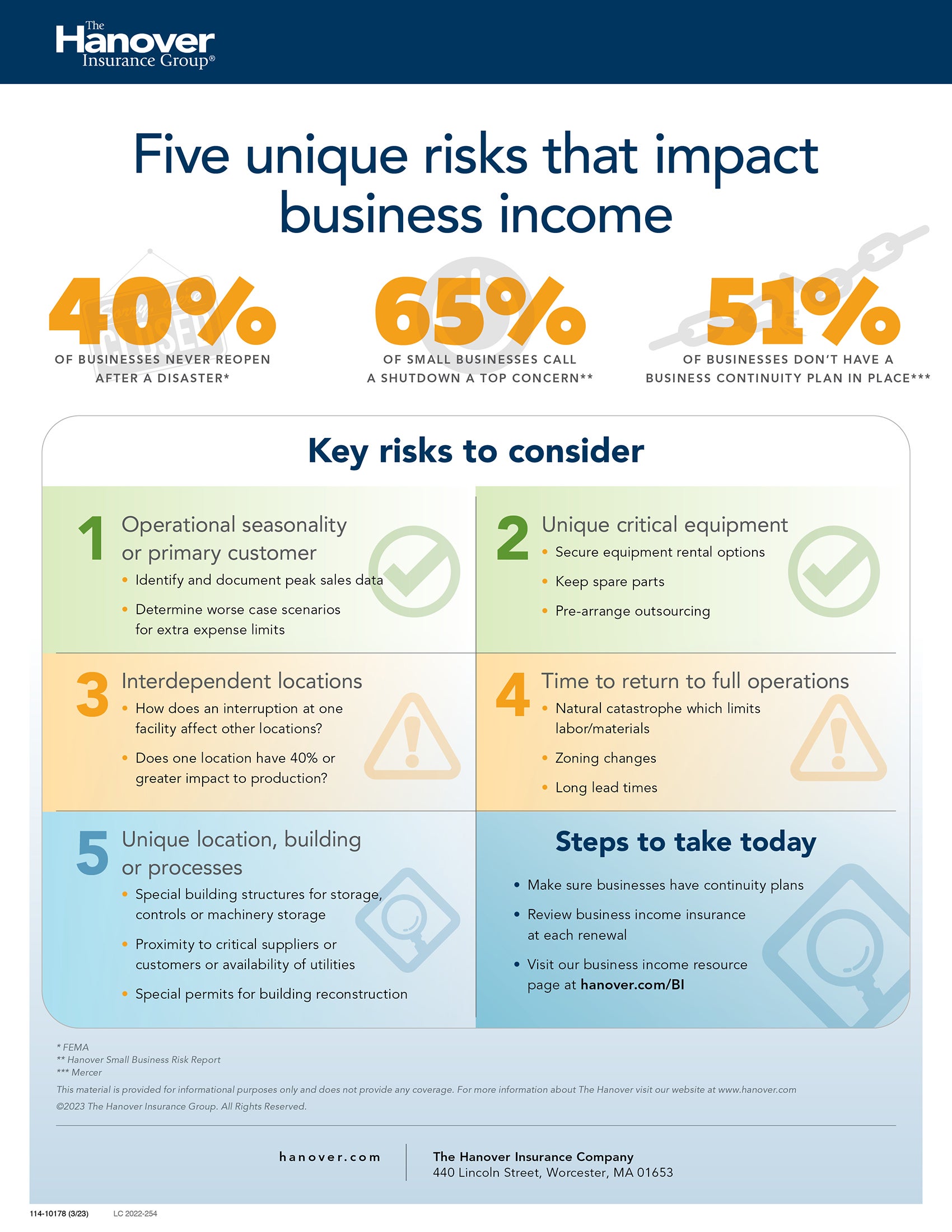
Business income risk by the numbers

Infographic outlining unique risks that businesses face when it comes to business income insurance


Learn more about the importance of a regular business income insurance review, and access valuable resources, on our dedicated business income resource page.

Take me there        Download this infographic


Article

5 questions to help you assess inland marine risk

Originally seen in Independent Agent.

When business owners first hear the term “marine insurance,” they may understandably immediately think of a big cargo ship on the water. Independent agents are tasked with bringing their attention back to land, where business owners face numerous risks that often require high-quality, dependable inland marine insurance—whether their risks are onsite, off-site, in transit or under construction. 

It can be challenging for some business owners to understand where inland marine insurance comes into play. Often, business owners mistakenly believe property policies will cover all their property-related risks. But the truth is an increasing number of businesses of all sizes need inland marine insurance to address specific property risks, and agents can help their clients recognize these areas of potential coverage shortfalls.

One client base in particular that can benefit from independent agents’ expertise is small businesses, with 69% of small businesses reporting they engage in one or more activities that present a marine risk, according to a recent study by The Hanover.

Here are five questions that can help identify potential vulnerabilities and the need for inland marine coverage. These include:

1) Does the business have buildings or structures under construction? Standard commercial property policies may exclude or may not fully cover claims related to buildings under construction or renovation.

2) Does the business have property that’s frequently moving to different locations? Certain businesses frequently move equipment from one location to another—for instance, construction, broadcasting, consulting and landscaping. That property is exposed to loss as it moves from location to location. Standard commercial property policies may exclude or may not fully cover business property in transit.

3) Does the business have employees who transport tools, equipment or other items for work purposes? Standard commercial property insurance typically provides only minimal limits for employee tools and equipment, such as a contractor’s tools brought to each job site.

4) Does the business have any property stored off-site? Standard commercial property policies may exclude or may not fully cover property stored at different locations. Yet space comes at a premium for many businesses, so they often turn to off-site storage facilities when they run out of room, such as a manufacturer's backup supply of raw materials or a retailer's unsold inventory.

5) Does the business have specialized, high-value property? Objects of great value, such as high-value artwork and customized manufacturing machinery, are not typically covered by standard commercial property insurance.

A "yes" answer to any of these questions indicates the business may be better protected by adding inland marine protection.

Independent agents can help business owners understand where they may need inland marine protection by reviewing the business’ standard property insurance policy and the value of their property.

The most expensive cost of inland marine insurance? Not having any.

As independent agents know, the unexpected can happen at any time, anywhere. Thankfully, customers can help ensure the longevity of their businesses with specialized inland marine coverage with dedicated limits.

A few hypothetical scenarios that highlight the importance of inland marine coverage are: 

  • Example 1: Vandals break into a multiple story apartment building under renovation and strike an exposed pipe that leaks undetected for hours, flooding the job site as well as some floors that were not under renovation. The cost to clean up the damage would be fully covered with the builder’s risk coverage form providing coverage for the existing building as well as cost of the renovations.
  • Example 2: While in transit to another job site, a contractor’s backhoe falls off its trailer after the truck hit a pothole. The cost to repair the backhoe would be fully covered with the contractor’s equipment policy.
  • Example 3: A small manufacturing firm’s stock of finished goods was destroyed in transit to a customer when a fire engulfed the truck hired to transport the finished products. The cost to resupply the finished products to the customer would be fully covered with the transportation policy that manufacturer had secured.

While each actual claim is evaluated under its own unique facts and circumstances and policy terms and conditions, in these hypothetical scenarios, the business owners clearly needed—and benefited from—inland marine insurance.

Deliver the coverage in a coordinated way

Hanover Marine, a top 10 marine writer, offers an extensive portfolio of products that meet the inland marine coverage needs of customers across a broad set of industries. This enables independent agents to offer clients the specialized inland marine coverage they need to be truly protected, while integrating into an account-focused solution. With this approach, customers benefit from a single bill and a single carrier contact, coordinated loss control activities, and policy language designed to complement and integrate with other policies offered by The Hanover.

Additionally, independent agents benefit from a more efficient placement experience and avoid the duplicate work required when policies are split among carriers.

To learn more about The Hanover’s robust suite of inland marine offerings, including online quote and issue capabilities for builders risk and contractors equipment, visit Agent Solutions.


Jason Muise headshot


About the author

Jason D. Muise is chief underwriting officer, marine, at The Hanover Insurance Group, Inc.


Article

Guidelines for securing public web servers

Web servers publish information publicly over the internet that can be accessed by a computer user through web browsers for information and data that the user needs.

Web servers can often be cyber-attack targets through many different direct and indirect methods, including malware, phishing, or misdirection of a user to an invalid website that looks to be legitimate.

Companies and organizations need to have strong web security measures in place to secure the web server(s) they operate and maintain.

Web server security

Companies and organizations need to regularly assess their security needs and identify areas of potential web server security risks. Companies must develop a written organizational plan for their security policies and security measures. The plan might include, but not be limited to the following:

  • Web server configuration and change controls/management policies:
    • Frequency of needed patches and upgrades to the operating system
    • Setting limitations of applications and services
    • Details of user authentication configurations
    • Any additional security measures specific to the company
    • Frequency of routine security testing
  • Security awareness and training for all employees
  • Contingency planning and response plans for any potential server breach
  • Controls and limitations for information that can be published on the web

To help assure overall web server security, an organization’s web server administrator should configure all new servers to meet the company’s specific identified security needs and should not rely on default manufacturer’s settings.

Securing a web server requires ongoing review and updates, including:

  • Overall system configuration and analysis of important data and files
  • Regular backups of critical information and data
  • Procedures for recovering from any potential data breach
  • Routinely testing and installing software patches, as needed
  • Routinely testing overall security measures

Protecting web content

Information on public websites is obviously intended for public use. But it is important to ensure this public information cannot be accessed or changed without proper authorization. Some controls may include, but not be limited to:

  • Limiting applications and services
  • Installing a host-based intrusion detection system or a prevention system to help detect any intrusions.
  • Using user-authentication controls
  • Continuous review and updates to network infrastructure that supports the web server, including firewalls, routers, etc.

Additional information

Further information and details regarding public web server security can be found through the U.S. Department of Commerce, Department of National Institute of Standards and Technology: NIST SP 800-44 Version 2, Guidelines on Securing Public Web Servers.


This material is provided for informational purposes only and does not provide any coverage or guarantee loss prevention. The examples in this material are provided as hypothetical and for illustration purposes only. The Hanover Insurance Company and its affiliates and subsidiaries (“The Hanover”) specifically disclaim any warranty or representation that acceptance of any recommendations contained herein will make any premises, or operation safe or in compliance with any law or regulation. By providing this information to you. The Hanover does not assume (and specifically disclaims) any duty, undertaking or responsibility to you. The decision to accept or implement any recommendation(s) or advice contained in this material must be made by you.


LC 2022-229

Article

Protecting computers from spyware

Spyware is a common attack measure many cybercriminals use against companies and individuals. It is a type of malicious software (malware) that will gather information from your computer systems and networks without you knowing or without your approval. 

Spyware has the capability of capturing screenshots of information, keystrokes, passwords, email addresses, internet usage or browsing habits, and other sensitive and personal information. Spyware will often use keywords such as bank names and online payment systems to prompt the spyware to start gathering information.

Spyware can be installed on your computer through phishing emails and other scams. Cyber criminals will then use the information they gather for personal or financial gain.

Spyware risks

Spyware will consume your computer system’s resources and the overall bandwidth of your network. If your computer or network is infected with spyware, there may be serious performance problems with your system and applications, including data loss and more frequent system crashes.

Spyware comes in many different forms and may include ways for the spyware operator to hijack browser sessions to lead the user to invalid websites. They may also use social engineering methods or use cookies and bugs to gather important information and data.

Preventing spyware

  • Operating systems and applications may have inherent vulnerabilities in their programming that a cybercriminal will try to exploit through social engineering methods. So it is important to always be mindful of downloading anything from public web sites, opening email attachments, etc. 
  • Avoid opening any links in pop-up ads or emails from unknown senders. Don’t allow ActiveX controls or browser plug-ins. Be careful of simply answering “No” to any requests for a download as this may prompt the spyware to load anyway. 
  • Be careful with application or software installations where the license or privacy agreements may allow monitoring or allow the company to install additional software.
  • Maintain regular updates of your computer’s operating system and install patches when they are made available. 
  • Keep your antivirus and anti-spyware software updated as well. 

Additional information

Further information regarding Spyware can be found through the Department of Homeland Security, Cybersecurity & Infrastructure Agency: Microsoft Word - Spyware_Final_USCERTversion.doc (cisa.gov).


This material is provided for informational purposes only and does not provide any coverage or guarantee loss prevention. The examples in this material are provided as hypothetical and for illustration purposes only. The Hanover Insurance Company and its affiliates and subsidiaries (“The Hanover”) specifically disclaim any warranty or representation that acceptance of any recommendations contained herein will make any premises, or operation safe or in compliance with any law or regulation. By providing this information to you. The Hanover does not assume (and specifically disclaims) any duty, undertaking or responsibility to you. The decision to accept or implement any recommendation(s) or advice contained in this material must be made by you.


LC 2022-228

Article

Mobile device security for laptops, tablets and smartphones

Laptops, tablets, and smartphones are targets for theft, mainly because of their small size (they can be easily stolen) and their relative value. Mobile devices are a market for easy cash through used-computer equipment stores and pawn shops.

If your laptop or smartphone is stolen, criminals may have access to personal information, financial information, and other sensitive data. They may then choose to use that information for personal gain and identity theft.

How to avoid becoming a victim

  • Always secure your devices. Don’t leave cellphones, computers or tablets in your vehicle, even if it is locked – especially in plain sight. If you must leave your devices in your vehicle, store them in the trunk or try to conceal them in a locked glove compartment or elsewhere in the vehicle where they cannot be seen.
  • Keep your devices in your bag or briefcase. Better yet, if the device is small enough, keep it in your pocket when you are walking or out in public.
  • Do not leave your devices unattended in a meeting or conference room. 
  • Use locking devices, such as cable locks, to secure a mobile device to a larger, permanent structure in your office.
  • Ensure that all your devices have a unique log-in. Don’t use the same password for different devices.
  • Ensure that devices log-off after a short period of inactivity. 
  • Regularly back up all important information and data that is on your mobile devices.
  • Always be mindful of your mobile devices, especially when flying and sending your devices through the X-ray scanner at the airport. Airport scams often include criminals working in pairs. One will pass through the scanner quickly, while the second scammer will hold up the line. In this example, the first scammer will then pick up a laptop or mobile device as if it belongs to him/her and walk away while the other scammer continues the distraction. To avoid this scam, only put your mobile device on the conveyor belt when it is your turn to go through the X-ray scanner. Alert security staff if you believe your device is in danger of being taken.
  • Be careful when leaving the store with any newly released mobile device that you purchase. These newly released electronics are often more vulnerable to being stolen. They are usually highly sought and more expensive, making them more valuable to the criminals as well. Try to avoid shopping and leaving a store alone or late at night.
  • If a theft of your mobile device does occur, report it immediately to the local police. Keep a record of the make, model, and serial number of each of your devices so that the police can file a complete report. They can then enter the information into the stolen electronic device database.  
  • Work with the local police on measures to recover your device. The police may ask you to contact your provider to have your cellphone or cell-enabled device “bricked.” This can make the device(s) essentially worthless to the criminal.

Additional information

Many local police departments and the Department of Homeland Security have regularly updated tips and information on protecting and preventing theft of mobile devices.

Check your local law enforcement for recent updates and any news on mobile device criminal activity in your area or where you may be traveling.


This material is provided for informational purposes only and does not provide any coverage or guarantee loss prevention. The examples in this material are provided as hypothetical and for illustration purposes only. The Hanover Insurance Company and its affiliates and subsidiaries (“The Hanover”) specifically disclaim any warranty or representation that acceptance of any recommendations contained herein will make any premises, or operation safe or in compliance with any law or regulation. By providing this information to you. The Hanover does not assume (and specifically disclaims) any duty, undertaking or responsibility to you. The decision to accept or implement any recommendation(s) or advice contained in this material must be made by you.


LC 2022-227

Article

Introduction to cybersecurity ― tips for small business

Many of our daily activities are online today and rely on computers and computer networks. These everyday activities include tasks such as email, entertainment, navigation, shopping, banking, and other tasks. Our daily routines are connected in so many ways and as a result, can become easy targets for criminals and computer hackers.

Cybersecurity is a way to protect our computer networks, devices and data from unauthorized access and potential criminal activity. These security measures can help ensure that all data, computer network systems and devices remain private and confidential, with only authorized access, so that everyone can continue their daily activities without interruption.

Cybersecurity risks

Hackers:  These are people who look for weaknesses in software and computers.  Some hackers may simply be curious or up to simple mischief, while others may have a more malicious intent, such as stealing personal information, financial data, and passwords for their own personal gain.

Malware, spyware and malicious code: These are “infected” programs that can create serious problems for computer systems. Computer viruses, worms and Trojan Horses are examples of cybersecurity risks. These harmful programs may require an email link to be opened to infect a computer or computer network. Other malicious code may simply identify a software vulnerability and infect an entire system without even requiring someone to click on an attachment or document.

Outdated software and vulnerabilities: Cyber attackers often look for software vulnerabilities to change programming code and attach their malware or spyware into the system. That’s why regular software updates are so important, and that cyber risks are continuously monitored.

Cybersecurity measures and tips

  • Don’t open unexpected, suspicious, or unusual emails.
  • Don’t click on links or open attachments in emails, even if they look to be from a reputable source. Always assure the email is legitimate before opening it.
  • Use strong passwords and consider a multi-factor authentication program to help verify a user’s identity. Multi-factor authentication often requires a password, and then some other form of identification verification, such as a code texted to your phone.
  • Keep software and antivirus software up to date. Hackers consistently look for vulnerabilities in software. Outdated software can lack serious patches that help eliminate susceptibility for hackers.
  • Use a Virtual Private Network (VPN) and a firewall to protect against unauthorized and malicious users intercepting or exploiting your VPN connection.
  • Avoid unnecessary connections, especially for remote workers using their laptops at public locations, such as coffee shops or other places where the security network may not be protected.
  • Assure that computer or network access is provided to authorized persons only. Do not allow unlimited access to your computer systems for contractors or anyone that you do not know.
  • Restrict access to your employees to only the systems and networks they need for their work. 
  • Assure there are “time-outs” where the employees are automatically logged out of their computers whenever they are away from their desks. Unlocked and unattended computers can be easy targets for unwanted access to your network and computer systems.
  • Train your employees on the importance of cybersecurity. Assure they know when security updates will automatically occur on their computers. Assure that remote virus scans are conducted regularly on all computers connected to your network.
  • Backup critical data on a routine basis. Backups may occur daily for newly added information, and then more in-depth monthly backups for all critical data and to refresh sensitive information as needed.
  • Screen employees before hire and prior to giving them access to your computers and computer systems. Screening may include criminal history checks and credit history.


When a data breach occurs

  • Be sure to have a business continuity plan already in place. An updated and documented plan for any potential data breach will help you and your company address the situation in a timely and organized manner.
  • When the data breach occurs, consult with your IT team and data forensics experts to help you learn more about the breach and then try to immediately secure all related areas. This would include changing all access permissions right away and updating user credentials and passwords.
  • Check your company’s online presence and remove any information that may have been posted online because of the data breach and hack. 
  • When the immediate threat has been controlled, then work with your team to strengthen your computer systems and networks, identify any further vulnerabilities, and strengthen all other defenses against future attacks. Once a cybercriminal is successful, they may revisit your networks to see if they can do it again.

Additional resources

Many organizations and smaller companies may find the task of cybersecurity overwhelming and may not know where to start or what to look for. The Department of Homeland Security, Cybersecurity & Infrastructure Security Agency has developed a set of Cyber Essentials Toolkits for Leaders, Staff, Computer Systems, The Digital Workplace, Business Data and Crisis Response. These toolkits can be found through the following link: Cyber Essentials Toolkits | CISA.

You may also monitor current hacker activity, malware, and other cybersecurity threats through the US-CERT, along with information regarding security updates for various software applications: Current Activity | CISA.


This material is provided for informational purposes only and does not provide any coverage or guarantee loss prevention. The examples in this material are provided as hypothetical and for illustration purposes only. The Hanover Insurance Company and its affiliates and subsidiaries (“The Hanover”) specifically disclaim any warranty or representation that acceptance of any recommendations contained herein will make any premises, or operation safe or in compliance with any law or regulation. By providing this information to you, The Hanover does not assume (and specifically disclaims) any duty, undertaking or responsibility to you. The decision to accept or implement any recommendation(s) or advice contained in this material must be made by you.

LC 2022-225


Video

The power of Platinum and Prestige together

Paul James explains how you can leverage Hanover Platinum and Prestige together.

Infographic

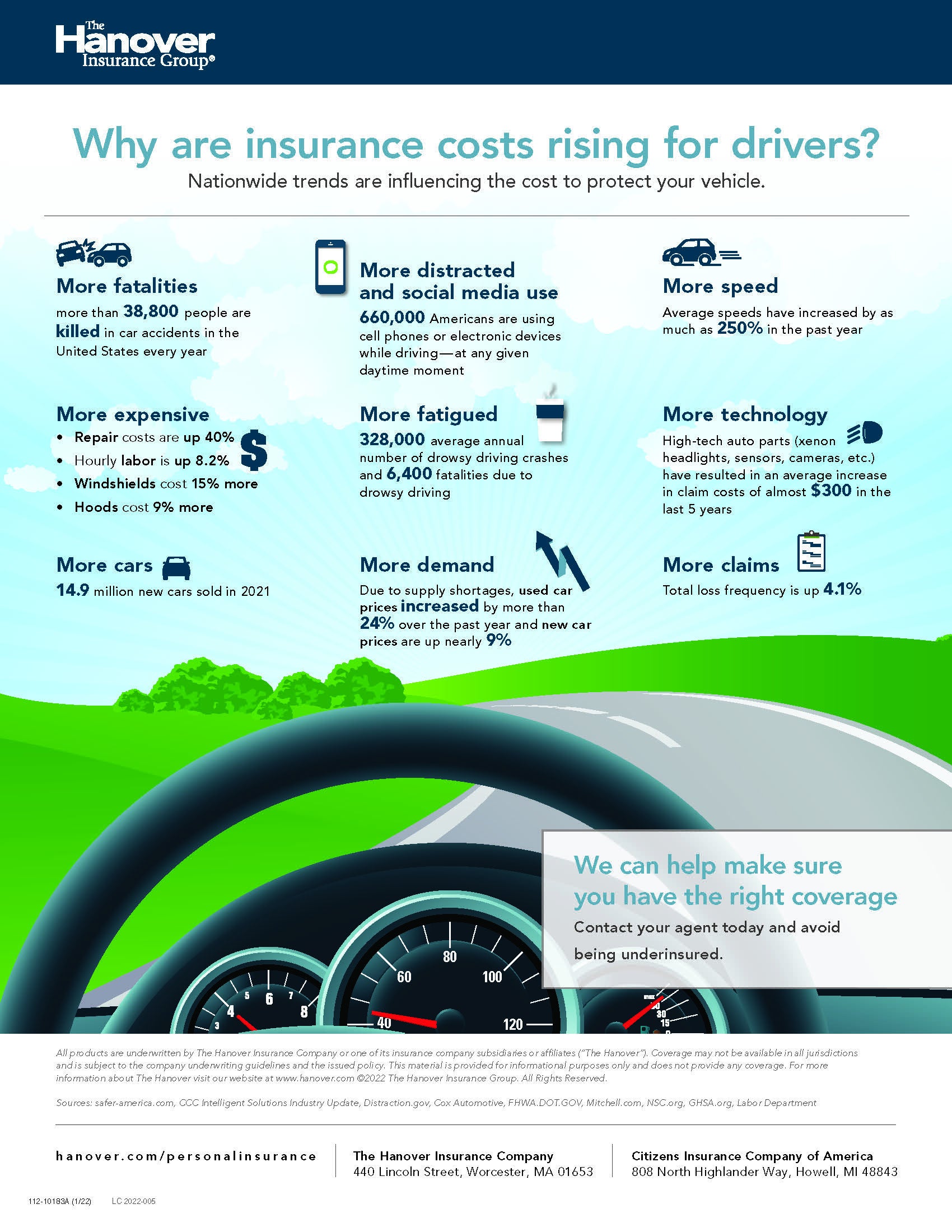
Why am I paying more for auto insurance?

Why are insurance costs rising for drivers?
Infographic

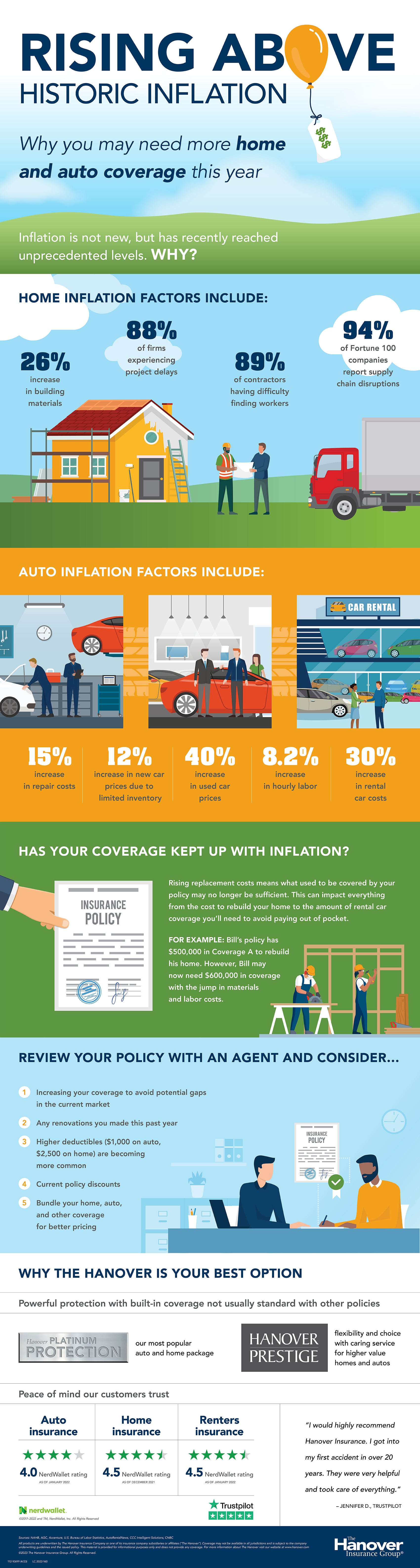
Rising above historic inflation

Rising above historic inflation


This infographic helps explain what factors are contributing to the trend towards historic inflation. Learn more in our inflation resource center

Download printable file (.PDF)

Article

Agents increasingly advising contractors to hire bonded subcontractors

As published in PropertyCasualty360

With general contractors experiencing pressure on a variety of fronts, independent agents are playing an increasingly important role on the construction site. As general contractors work to complete jobs on schedule, within budget and according to specifications, they rely on subcontractors to do the same. Unfortunately, many subcontractors are having difficulty meeting commitments due to labor and supply shortages, and even the best can make scheduling errors, mismanage payments to employees and vendors, and more.

Given the prevailing market dynamics, independent agents increasingly are advising general contractors to require subcontractors to be bonded – minimizing general contractors’ financial risks and bolstering their risk management programs. 

To bond or not to bond?

If a subcontractor fails to execute, it can spell disaster for the general contractor who can ultimately be held financially responsible. Couple this with the rising costs of materials, the ongoing supply chain issues and the widespread labor shortage, and contractors could face a variety of risks in today’s market. While it very often makes sense for a general contractor to require subcontractors to be bonded, that’s not always the case, in particular, if replacement subcontractors and materials can be easily lined up. The following are key considerations of experienced agents.

  1. Size and importance of the subcontract: Is the subcontractor performing a large-scale job that is critical to the completion of the project and has subsequent jobs dependent on its completion, such as electrical or plumbing?
  1. Size of the bid spread between a subcontractor and other bidders: How far is the subcontractor’s bid away from other subcontractors’ bids? If the bid is significantly lower than the other bids (more than a 10% difference), did the subcontractor ensure nothing was omitted? In some instances, bids on the extremes may indicate a lack of experience or forecast a potential issue in the subcontractor’s ability to pay employees and/or suppliers if the actual cost is more than anticipated in the bid.
  1. Past work experiences, financial strength and payment history of a subcontractor: Does the subcontractor have a proven history of performance, including payments to its employees and suppliers?
  1. Availability of replacement subcontractors in the event of a default: Is the subcontractor performing specialized work? How easy would it be to replace the subcontractor without impacting the overall project timeline?
  1. Specialty materials or equipment within a subcontractor’s scope: Is the subcontractor responsible for ordering special materials or arranging equipment rentals? What would happen if an incorrect delivery date is provided, the wrong material is ordered or materials are held for late payment, resulting in a delay in the overall project timeline?
  1. Aggregation exposure: Is the subcontractor performing multiple types of work on any one job, or, is the subcontractor working on multiple jobs for the general contractor? What would the impact be to one or all jobs if that subcontractor unexpectedly became insolvent?
  1. Previous experience with the subcontractor: Is the subcontractor considered a new working relationship for the general contractor? In some situations, a general contractor’s preferred subcontractor may be unavailable. In that case, would the general contractor want protection for new relationship’s performance? 

Benefits of subcontractor bonds

By requiring bid bonds from subcontractors, general contractors can guard themselves against increased costs that may be incurred if a subcontractor does not enter the contract. At the same time, it provides assurance the subcontractors were prequalified by a surety underwriter, ensuring they have the experience and financial means to complete the project. 

Subcontractor performance and payment bonds help to mitigate the financial harm associated with the risk that the subcontractor will fail to complete the project according to the contract terms, and helps to ensure bills for labor and material incurred by the subcontractor will be paid. 

Requiring subcontractors to be bonded is an important step general contractors can take to mitigate their project risks. Contractors can leverage the knowledge of carriers and agencies that are deeply experienced in the intricacies of construction surety bonding. By analyzing bonded subcontractors and looking into the current state of subcontractors’ financials, current roster of projects and more, a carrier can offer important information to help general contractors protect their businesses. The Hanover can assist independent agents and general contractors in creating the right surety program for their unique needs.


Learn more

About the author

Jim Kawiecki is the president of surety at The Hanover. An industry leader with more than 30 years of experience, Jim has served in a variety of leadership roles in the industry and has extensive expertise in strategy, sales, and marketing and distribution for contract surety.

Reprinted with permission from the June issue of PropertyCasualty360. Further duplication without permission is prohibited.  All rights reserved.

Subscribe to