



Keep your identity safe – online and in line

According to the Insurance Information Institute, 47 percent of Americans experienced some form of financial identity theft in 2020. Losses from these identity theft cases account for $712.4 billion in losses - a 42 percent jump from the previous year.
In addition, identity theft attacks are increasing against those with high-value personal net worths, especially those with a liquid net worth of $1 million or more, and those with lucrative retirement funds. According to LifeLock, high income earners are among the most targeted victim groups of identity theft.
With this activity on the rise and with so much at stake, here are some simple practices to help you stay protected against cyber fraud.
While shopping at a store
- Keep your Social Security…secure – Only give out your Social Security Number when absolutely necessary and required. Don’t carry your card in your wallet.
- Protect your PIN – Never write a PIN on a credit/debit card or on a slip of paper kept in your wallet.
- Watch out for "shoulder surfers” – Use your free hand to shield the keypad when using checkout keypads and ATMs.
- Don’t leave your credit card visible for extended time – Identity thieves can quickly write down your card number, or may even try to take pictures of it with their mobile devices
- Keep your receipts – Promptly compare receipts with account statements. Watch for unauthorized transactions.
When shopping online
- Think before you act – Be wary of emails that offer deals that sound too good to be true, and implore you to act immediately.
- When in doubt, throw it out – If an email looks suspicious, it’s best to simply delete it or mark it as junk, and do not reply.
- Make sure the websites you visit are legitimate – This includes a closed padlock on your web browser or a URL address that begins with http or https.
- Protect your personal information – Make sure the information requested of you is limited to only what is needed to complete the transaction.
- Keep a clean machine – All the devices you use for shopping—including smartphones and tablets—should have up-to-date software including security software, operating systems, programs and apps.
- Be savvy about Wi-Fi hotspots – Don’t share personal or financial information over an unsecured Wi-Fi network, which could be a haven for ID thieves. Secure networks require a password for access.
- Keep a paper trail – Save records of your online transactions. Read your credit card statements as soon as you get them and, if there is a discrepancy, report it immediately.
The right IDea
The Hanover partners with CyberScout, the nation’s leader in identity management and fraud education, to help customers prevent and resolve identity theft. Our identity theft coverage is available through certain Hanover home insurance policies, and can be purchased as a standalone policy as well. This powerful coverage includes protection for:
- Restoration services if your wallet or purse is lost or stolen or you suspect your identity has been compromised and might be vulnerable.
- Expense reimbursement coverage for expenses such as preparing and notarizing documents, sending certified mail, reasonable attorney fees and more.
- Document replacement assistance to provide guidance and help in replacing lost, stolen or destroyed identity documents, including Social Security cards, birth certificates, passports and driver’s licenses.
Make sure you talk to your independent insurance agent today to see if you are covered in the event of an identity theft, and to learn more about the right coverage and carrier to keep you protected. Consider talking to your about cyber coverage. The Hanover has cyber coverage options up to $100,000 for homeowners for protection against cyberattacks, cyber extortion, online fraud, cyberbullying and more.
To help further protect your lifestyle from malicious scammers, talk to your agent about The Hanover Prestige's suite of protection options to see if it may be right for you.
Sources: Javelin Strategy, Kiplinger, SVB
LC 2021-501
Keep your identity safe – online and in line
According to the Insurance Information Institute, 47 percent of Americans experienced some form of financial identity theft in 2020. Losses from these identity theft cases account for $712.4 billion in losses - a 42 percent jump from the previous year.
In addition, identity theft attacks are increasing against those with high-value personal net worths, especially those with a liquid net worth of $1 million or more, and those with lucrative retirement funds. According to LifeLock, high income earners are among the most targeted victim groups of identity theft.
With this activity on the rise and with so much at stake, here are some simple practices to help you stay protected against cyber fraud.
While shopping at a store
- Keep your Social Security…secure – Only give out your Social Security Number when absolutely necessary and required. Don’t carry your card in your wallet.
- Protect your PIN – Never write a PIN on a credit/debit card or on a slip of paper kept in your wallet.
- Watch out for "shoulder surfers” – Use your free hand to shield the keypad when using checkout keypads and ATMs.
- Don’t leave your credit card visible for extended time – Identity thieves can quickly write down your card number, or may even try to take pictures of it with their mobile devices
- Keep your receipts – Promptly compare receipts with account statements. Watch for unauthorized transactions.
When shopping online
- Think before you act – Be wary of emails that offer deals that sound too good to be true, and implore you to act immediately.
- When in doubt, throw it out – If an email looks suspicious, it’s best to simply delete it or mark it as junk, and do not reply.
- Make sure the websites you visit are legitimate – This includes a closed padlock on your web browser or a URL address that begins with http or https.
- Protect your personal information – Make sure the information requested of you is limited to only what is needed to complete the transaction.
- Keep a clean machine – All the devices you use for shopping—including smartphones and tablets—should have up-to-date software including security software, operating systems, programs and apps.
- Be savvy about Wi-Fi hotspots – Don’t share personal or financial information over an unsecured Wi-Fi network, which could be a haven for ID thieves. Secure networks require a password for access.
- Keep a paper trail – Save records of your online transactions. Read your credit card statements as soon as you get them and, if there is a discrepancy, report it immediately.
The right IDea
The Hanover partners with CyberScout, the nation’s leader in identity management and fraud education, to help customers prevent and resolve identity theft. Our identity theft coverage is available through certain Hanover home insurance policies, and can be purchased as a standalone policy as well. This powerful coverage includes protection for:
- Restoration services if your wallet or purse is lost or stolen or you suspect your identity has been compromised and might be vulnerable.
- Expense reimbursement coverage for expenses such as preparing and notarizing documents, sending certified mail, reasonable attorney fees and more.
- Document replacement assistance to provide guidance and help in replacing lost, stolen or destroyed identity documents, including Social Security cards, birth certificates, passports and driver’s licenses.
Make sure you talk to your independent insurance agent today to see if you are covered in the event of an identity theft, and to learn more about the right coverage and carrier to keep you protected. Consider talking to your about cyber coverage. The Hanover has cyber coverage options up to $100,000 for homeowners for protection against cyberattacks, cyber extortion, online fraud, cyberbullying and more.
To help further protect your lifestyle from malicious scammers, talk to your agent about The Hanover Prestige's suite of protection options to see if it may be right for you.
Sources: Javelin Strategy, Kiplinger, SVB
LC 2021-501
Keep your identity safe – online and in line
According to the Insurance Information Institute, 47 percent of Americans experienced some form of financial identity theft in 2020. Losses from these identity theft cases account for $712.4 billion in losses - a 42 percent jump from the previous year.
In addition, identity theft attacks are increasing against those with high-value personal net worths, especially those with a liquid net worth of $1 million or more, and those with lucrative retirement funds. According to LifeLock, high income earners are among the most targeted victim groups of identity theft.
With this activity on the rise and with so much at stake, here are some simple practices to help you stay protected against cyber fraud.
While shopping at a store
- Keep your Social Security…secure – Only give out your Social Security Number when absolutely necessary and required. Don’t carry your card in your wallet.
- Protect your PIN – Never write a PIN on a credit/debit card or on a slip of paper kept in your wallet.
- Watch out for "shoulder surfers” – Use your free hand to shield the keypad when using checkout keypads and ATMs.
- Don’t leave your credit card visible for extended time – Identity thieves can quickly write down your card number, or may even try to take pictures of it with their mobile devices
- Keep your receipts – Promptly compare receipts with account statements. Watch for unauthorized transactions.
When shopping online
- Think before you act – Be wary of emails that offer deals that sound too good to be true, and implore you to act immediately.
- When in doubt, throw it out – If an email looks suspicious, it’s best to simply delete it or mark it as junk, and do not reply.
- Make sure the websites you visit are legitimate – This includes a closed padlock on your web browser or a URL address that begins with http or https.
- Protect your personal information – Make sure the information requested of you is limited to only what is needed to complete the transaction.
- Keep a clean machine – All the devices you use for shopping—including smartphones and tablets—should have up-to-date software including security software, operating systems, programs and apps.
- Be savvy about Wi-Fi hotspots – Don’t share personal or financial information over an unsecured Wi-Fi network, which could be a haven for ID thieves. Secure networks require a password for access.
- Keep a paper trail – Save records of your online transactions. Read your credit card statements as soon as you get them and, if there is a discrepancy, report it immediately.
The right IDea
The Hanover partners with CyberScout, the nation’s leader in identity management and fraud education, to help customers prevent and resolve identity theft. Our identity theft coverage is available through certain Hanover home insurance policies, and can be purchased as a standalone policy as well. This powerful coverage includes protection for:
- Restoration services if your wallet or purse is lost or stolen or you suspect your identity has been compromised and might be vulnerable.
- Expense reimbursement coverage for expenses such as preparing and notarizing documents, sending certified mail, reasonable attorney fees and more.
- Document replacement assistance to provide guidance and help in replacing lost, stolen or destroyed identity documents, including Social Security cards, birth certificates, passports and driver’s licenses.
Make sure you talk to your independent insurance agent today to see if you are covered in the event of an identity theft, and to learn more about the right coverage and carrier to keep you protected. Consider talking to your about cyber coverage. The Hanover has cyber coverage options up to $100,000 for homeowners for protection against cyberattacks, cyber extortion, online fraud, cyberbullying and more.
To help further protect your lifestyle from malicious scammers, talk to your agent about The Hanover Prestige's suite of protection options to see if it may be right for you.
Sources: Javelin Strategy, Kiplinger, SVB
LC 2021-501
Keep your identity safe – online and in line
According to the Insurance Information Institute, 47 percent of Americans experienced some form of financial identity theft in 2020. Losses from these identity theft cases account for $712.4 billion in losses - a 42 percent jump from the previous year.
In addition, identity theft attacks are increasing against those with high-value personal net worths, especially those with a liquid net worth of $1 million or more, and those with lucrative retirement funds. According to LifeLock, high income earners are among the most targeted victim groups of identity theft.
With this activity on the rise and with so much at stake, here are some simple practices to help you stay protected against cyber fraud.
While shopping at a store
- Keep your Social Security…secure – Only give out your Social Security Number when absolutely necessary and required. Don’t carry your card in your wallet.
- Protect your PIN – Never write a PIN on a credit/debit card or on a slip of paper kept in your wallet.
- Watch out for "shoulder surfers” – Use your free hand to shield the keypad when using checkout keypads and ATMs.
- Don’t leave your credit card visible for extended time – Identity thieves can quickly write down your card number, or may even try to take pictures of it with their mobile devices
- Keep your receipts – Promptly compare receipts with account statements. Watch for unauthorized transactions.
When shopping online
- Think before you act – Be wary of emails that offer deals that sound too good to be true, and implore you to act immediately.
- When in doubt, throw it out – If an email looks suspicious, it’s best to simply delete it or mark it as junk, and do not reply.
- Make sure the websites you visit are legitimate – This includes a closed padlock on your web browser or a URL address that begins with http or https.
- Protect your personal information – Make sure the information requested of you is limited to only what is needed to complete the transaction.
- Keep a clean machine – All the devices you use for shopping—including smartphones and tablets—should have up-to-date software including security software, operating systems, programs and apps.
- Be savvy about Wi-Fi hotspots – Don’t share personal or financial information over an unsecured Wi-Fi network, which could be a haven for ID thieves. Secure networks require a password for access.
- Keep a paper trail – Save records of your online transactions. Read your credit card statements as soon as you get them and, if there is a discrepancy, report it immediately.
The right IDea
The Hanover partners with CyberScout, the nation’s leader in identity management and fraud education, to help customers prevent and resolve identity theft. Our identity theft coverage is available through certain Hanover home insurance policies, and can be purchased as a standalone policy as well. This powerful coverage includes protection for:
- Restoration services if your wallet or purse is lost or stolen or you suspect your identity has been compromised and might be vulnerable.
- Expense reimbursement coverage for expenses such as preparing and notarizing documents, sending certified mail, reasonable attorney fees and more.
- Document replacement assistance to provide guidance and help in replacing lost, stolen or destroyed identity documents, including Social Security cards, birth certificates, passports and driver’s licenses.
Make sure you talk to your independent insurance agent today to see if you are covered in the event of an identity theft, and to learn more about the right coverage and carrier to keep you protected. Consider talking to your about cyber coverage. The Hanover has cyber coverage options up to $100,000 for homeowners for protection against cyberattacks, cyber extortion, online fraud, cyberbullying and more.
To help further protect your lifestyle from malicious scammers, talk to your agent about The Hanover Prestige's suite of protection options to see if it may be right for you.
Sources: Javelin Strategy, Kiplinger, SVB
LC 2021-501
What to expect after reporting an auto claim

We’ll help you get back on the road as quickly and easily as possible using the approach that’s right for you including virtual and digital self-service tools, in-person assistance, and/or vendor partners.

What to expect after reporting an auto claim
We’ll help you get back on the road as quickly and easily as possible using the approach that’s right for you including virtual and digital self-service tools, in-person assistance, and/or vendor partners.
What to expect after reporting an auto claim
We’ll help you get back on the road as quickly and easily as possible using the approach that’s right for you including virtual and digital self-service tools, in-person assistance, and/or vendor partners.
Remote workstation self-assessment
This material is provided for informational purposes only and does not provide any coverage or guarantee loss prevention. The examples in this material are provided as hypothetical and for illustration purposes only. The Hanover Insurance Company and its affiliates and subsidiaries (“The Hanover”) specifically disclaim any warranty or representation that acceptance of any recommendations contained herein will make any premises, or operation safe or in compliance with any law or regulation. By providing this information to you. The Hanover does not assume (and specifically disclaims) any duty, undertaking or responsibility to you. The decision to accept or implement any recommendation(s) or advice contained in this material must be made by you.
Remote workstation self-assessment
This material is provided for informational purposes only and does not provide any coverage or guarantee loss prevention. The examples in this material are provided as hypothetical and for illustration purposes only. The Hanover Insurance Company and its affiliates and subsidiaries (“The Hanover”) specifically disclaim any warranty or representation that acceptance of any recommendations contained herein will make any premises, or operation safe or in compliance with any law or regulation. By providing this information to you. The Hanover does not assume (and specifically disclaims) any duty, undertaking or responsibility to you. The decision to accept or implement any recommendation(s) or advice contained in this material must be made by you.
Remote workstation self-assessment
This material is provided for informational purposes only and does not provide any coverage or guarantee loss prevention. The examples in this material are provided as hypothetical and for illustration purposes only. The Hanover Insurance Company and its affiliates and subsidiaries (“The Hanover”) specifically disclaim any warranty or representation that acceptance of any recommendations contained herein will make any premises, or operation safe or in compliance with any law or regulation. By providing this information to you. The Hanover does not assume (and specifically disclaims) any duty, undertaking or responsibility to you. The decision to accept or implement any recommendation(s) or advice contained in this material must be made by you.
- Transcript
-
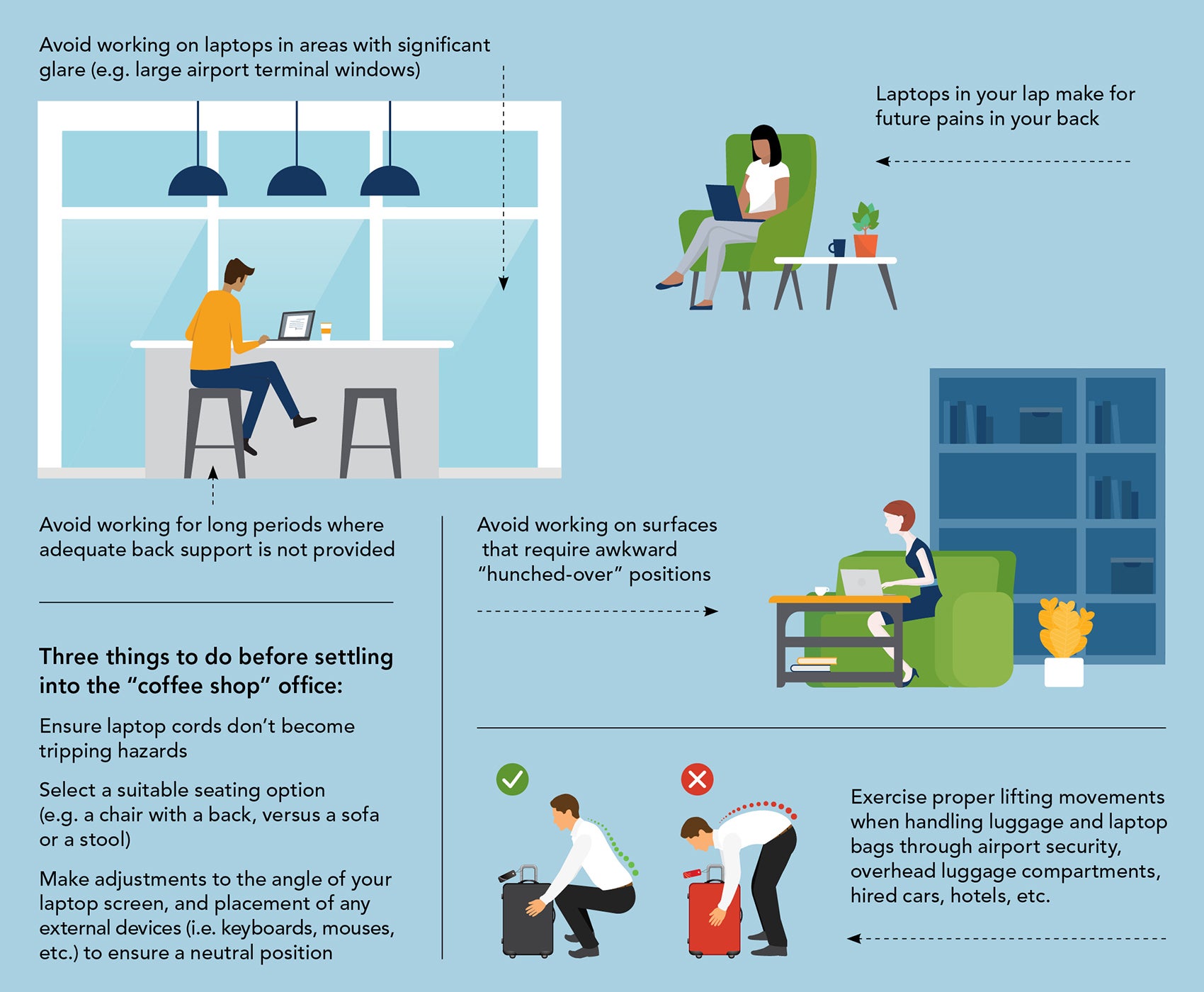
Avoid working on laptops in areas with significant glare (e.g. large airport terminal windows.
Avoid working for long periods where adequate back support is not provided.
Laptops in your lap make for future pain in your back.
Avoid working on surfaces that require awkward "hunched-over" positions.
Exercise proper lifting movements when handling luggage and laptop bags through airport security, overhead luggage compartments, hired cars, hotels, etc.
Three things to do before settling into the "coffee shop" office:
- Ensure laptop cords don't become tripping hazards
- Select a suitable seating option (e.g. a chair with a back, versus a sofa or a stool)
- Make adjustments to the angle of your laptop screen, and placement of any external devices (i.e. keyboards, mouses, etc.) to ensure a neutral position
Remote workstation self-assessment
This material is provided for informational purposes only and does not provide any coverage or guarantee loss prevention. The examples in this material are provided as hypothetical and for illustration purposes only. The Hanover Insurance Company and its affiliates and subsidiaries (“The Hanover”) specifically disclaim any warranty or representation that acceptance of any recommendations contained herein will make any premises, or operation safe or in compliance with any law or regulation. By providing this information to you. The Hanover does not assume (and specifically disclaims) any duty, undertaking or responsibility to you. The decision to accept or implement any recommendation(s) or advice contained in this material must be made by you.
Sitting workstation self-assessment
This material is provided for informational purposes only and does not provide any coverage or guarantee loss prevention. The examples in this material are provided as hypothetical and for illustration purposes only. The Hanover Insurance Company and its affiliates and subsidiaries (“The Hanover”) specifically disclaim any warranty or representation that acceptance of any recommendations contained herein will make any premises, or operation safe or in compliance with any law or regulation. By providing this information to you, The Hanover does not assume (and specifically disclaims) any duty, undertaking or responsibility to you. The decision to accept or implement any recommendation(s) or advice contained in this material must be made by you.
Sitting workstation self-assessment
This material is provided for informational purposes only and does not provide any coverage or guarantee loss prevention. The examples in this material are provided as hypothetical and for illustration purposes only. The Hanover Insurance Company and its affiliates and subsidiaries (“The Hanover”) specifically disclaim any warranty or representation that acceptance of any recommendations contained herein will make any premises, or operation safe or in compliance with any law or regulation. By providing this information to you, The Hanover does not assume (and specifically disclaims) any duty, undertaking or responsibility to you. The decision to accept or implement any recommendation(s) or advice contained in this material must be made by you.
Sitting workstation self-assessment
This material is provided for informational purposes only and does not provide any coverage or guarantee loss prevention. The examples in this material are provided as hypothetical and for illustration purposes only. The Hanover Insurance Company and its affiliates and subsidiaries (“The Hanover”) specifically disclaim any warranty or representation that acceptance of any recommendations contained herein will make any premises, or operation safe or in compliance with any law or regulation. By providing this information to you, The Hanover does not assume (and specifically disclaims) any duty, undertaking or responsibility to you. The decision to accept or implement any recommendation(s) or advice contained in this material must be made by you.
- Transcript
-
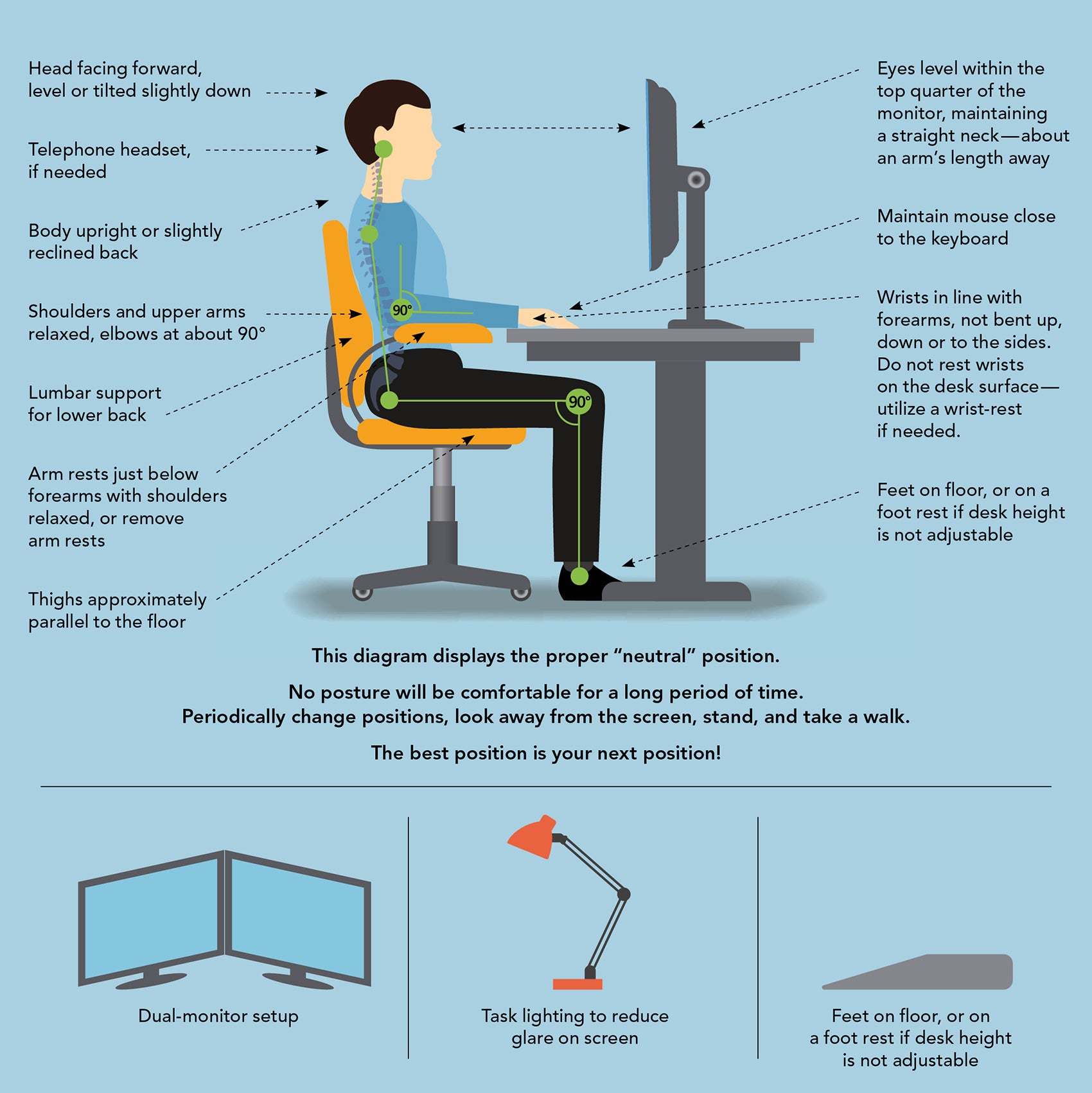
Head facing forward, level or tilted slightly down.
Telephone headset if needed.
Body upright or slightly reclined back.
Shoulders and upper arms relaxed, elbows at 90 degrees.
Lumbar support for lower back.
Arm rests just below forearms with shoulders relaxed, or remove arm rests.
Thighs approximately parallel to the floor.
Eyes level within the top quarter of the monitor, maintaining straight neck — about an arm's length away.
Maintain mouse close to the keyboard.
Wrist in line with forearms, not bent up, down or to the sides. Do not rest writs on the desk surface — utilize a wrist rest if needed.
Feet on the floor, or on a foot rest if desk height is not adjustable.
This diagram displays a proper "neutral" position.
No posture will be comfortable for a long period of time. Periodically change positions, look away from the screen, stand, and take a walk.
The best position is your next position!
Dual monitor setup.
Task lighting to reduce glare on screen.
Feet on floor, or on a foot rest if desk height is not adjustable..
Sitting workstation self-assessment
This material is provided for informational purposes only and does not provide any coverage or guarantee loss prevention. The examples in this material are provided as hypothetical and for illustration purposes only. The Hanover Insurance Company and its affiliates and subsidiaries (“The Hanover”) specifically disclaim any warranty or representation that acceptance of any recommendations contained herein will make any premises, or operation safe or in compliance with any law or regulation. By providing this information to you, The Hanover does not assume (and specifically disclaims) any duty, undertaking or responsibility to you. The decision to accept or implement any recommendation(s) or advice contained in this material must be made by you.
Technical tips for remote workers

Due to the current situation with the coronavirus outbreak, many businesses have asked employees to work remotely. More people working remotely could mean virtual traffic jams at peak hours. For example, if three times more people are trying to connect to your network, you could experience a slow down in response time.
Here are some tips to help you and your teams remain productive.
- Be mindful and reduce the number of applications and Internet browser windows you have open at any given time. This will help increase your network’s bandwidth.
- Did you know streaming videos (i.e., Netflix, Disney+, etc.) and gaming online can slow your home’s Internet connection? To be efficient, consider talking with those who live with you and asking them to limit these activities during work hours.
- Limit the use of video conferencing and consider calling a colleague or dialing into a conference call instead of participating through your computer. These actions also will help increase your network’s bandwidth.
Technical tips for remote workers
Due to the current situation with the coronavirus outbreak, many businesses have asked employees to work remotely. More people working remotely could mean virtual traffic jams at peak hours. For example, if three times more people are trying to connect to your network, you could experience a slow down in response time.
Here are some tips to help you and your teams remain productive.
- Be mindful and reduce the number of applications and Internet browser windows you have open at any given time. This will help increase your network’s bandwidth.
- Did you know streaming videos (i.e., Netflix, Disney+, etc.) and gaming online can slow your home’s Internet connection? To be efficient, consider talking with those who live with you and asking them to limit these activities during work hours.
- Limit the use of video conferencing and consider calling a colleague or dialing into a conference call instead of participating through your computer. These actions also will help increase your network’s bandwidth.
Technical tips for remote workers
Due to the current situation with the coronavirus outbreak, many businesses have asked employees to work remotely. More people working remotely could mean virtual traffic jams at peak hours. For example, if three times more people are trying to connect to your network, you could experience a slow down in response time.
Here are some tips to help you and your teams remain productive.
- Be mindful and reduce the number of applications and Internet browser windows you have open at any given time. This will help increase your network’s bandwidth.
- Did you know streaming videos (i.e., Netflix, Disney+, etc.) and gaming online can slow your home’s Internet connection? To be efficient, consider talking with those who live with you and asking them to limit these activities during work hours.
- Limit the use of video conferencing and consider calling a colleague or dialing into a conference call instead of participating through your computer. These actions also will help increase your network’s bandwidth.
Technical tips for remote workers
Due to the current situation with the coronavirus outbreak, many businesses have asked employees to work remotely. More people working remotely could mean virtual traffic jams at peak hours. For example, if three times more people are trying to connect to your network, you could experience a slow down in response time.
Here are some tips to help you and your teams remain productive.
- Be mindful and reduce the number of applications and Internet browser windows you have open at any given time. This will help increase your network’s bandwidth.
- Did you know streaming videos (i.e., Netflix, Disney+, etc.) and gaming online can slow your home’s Internet connection? To be efficient, consider talking with those who live with you and asking them to limit these activities during work hours.
- Limit the use of video conferencing and consider calling a colleague or dialing into a conference call instead of participating through your computer. These actions also will help increase your network’s bandwidth.
Steps to close a facility safely

If you need or are required to shutdown a facility temporarily, there are several steps you can follow to protect your property and help ensure your building is in good condition when it’s time to reopen.
Building security
- Ensure all windows, doors, and access points (including roof hatches) are locked and fully secured.
- Activate all burglar alarm systems including motion and door detection.
- Ensure all lighting on the exterior of the property is operational and active.
- Secure all gates and ensure fencing is in good condition and securely installed.
- Ensure all CCTV and video security equipment is operational and active for both the interior and exterior of the building. All recordings should be saved to a cloud server for a minimum of two weeks. Otherwise, onsite video backup should be in use.
- Schedule all data backups to run.
- Remove any cash or high-value materials or secure them in safes, vaults, etc.
Water damage prevention
- Ensure heating systems are operational and that heat is maintained at a minimum of 50 degrees inside the building to prevent freezing of plumbing and sprinkler pipes. In warmer climates ensure the air conditioning is set to 80 degrees to protect against humidity and mold growth.
- Shut off all water supply lines underneath individual sinks and toilets. If unable to do this, ensure all sink taps are in the off position and no toilets are “running.”
- Install a monitored leak and temperature detection system. The Hanover offers a leak and temperature detection solution.
- Check that all sump pumps, if applicable, are operational and functioning properly.
- Clear all gutters and downspouts of debris.
- Repair any roof leaks, if present.
Fire prevention
- Ensure all fire detection systems and fire sprinkler systems are active and alarm monitored.
- Ensure access to the sprinkler riser and valves is accessible by emergency personnel.
- Fire sprinkler system control valves should be chained/locked or monitored by a control valve alarm.
- If a fire pump is present and liquid fueled, ensure that the fire pump fuel tank is full.
- If a fire suppression suction tank is present, ensure the tank has adequate water.
- Any fire hydrants on the property should be clear and the surrounding area accessible.
- Move combustible materials away from heat sources or electrical equipment.
- With the exception of electrical, heating, and building maintenance equipment, properly shut down any non-essential production or other equipment/systems.
- Move dumpsters and any combustible materials on the exterior of the building to at least 50 feet from the building structure.
- If possible and already in small containers, remove all chemicals and/or flammable liquids from the building.
- Keep lockboxes (if applicable) in a location that is readily visible and operational for fire department access.
- Clear debris and vehicles from interior and exterior entrances, lots and surrounding areas of the building to enable quick access for emergency personnel.
- Close all fire doors or ensure all self-closing mechanisms are in working condition and operational.
Management controls
- Provide the fire and burglar alarm company with updated business contact information.
- Ensure all keys or access cards for exterior doors are accounted for and with the appropriate persons.
- Remove all food and other items that may attract pests or rodents.
- Continue care of landscaping. This shows that the owner is still monitoring the property and also reduces the fire risk.
- As allowed by state and local authorities, regularly visit the property to check the condition.
This material is provided for informational purposes only and does not provide any coverage or guarantee loss prevention. The examples in this material are provided as hypothetical and for illustration purposes only. The Hanover Insurance Company and its affiliates and subsidiaries (“The Hanover”) specifically disclaim any warranty or representation that acceptance of any recommendations contained herein will make any premises, or operation safe or in compliance with any law or regulation. By providing this information to you, The Hanover does not assume (and specifically disclaims) any duty, undertaking or responsibility to you. The decision to accept or implement any recommendation(s) or advice contained in this material must be made by you.
Steps to close a facility safely
If you need or are required to shutdown a facility temporarily, there are several steps you can follow to protect your property and help ensure your building is in good condition when it’s time to reopen.
Building security
- Ensure all windows, doors, and access points (including roof hatches) are locked and fully secured.
- Activate all burglar alarm systems including motion and door detection.
- Ensure all lighting on the exterior of the property is operational and active.
- Secure all gates and ensure fencing is in good condition and securely installed.
- Ensure all CCTV and video security equipment is operational and active for both the interior and exterior of the building. All recordings should be saved to a cloud server for a minimum of two weeks. Otherwise, onsite video backup should be in use.
- Schedule all data backups to run.
- Remove any cash or high-value materials or secure them in safes, vaults, etc.
Water damage prevention
- Ensure heating systems are operational and that heat is maintained at a minimum of 50 degrees inside the building to prevent freezing of plumbing and sprinkler pipes. In warmer climates ensure the air conditioning is set to 80 degrees to protect against humidity and mold growth.
- Shut off all water supply lines underneath individual sinks and toilets. If unable to do this, ensure all sink taps are in the off position and no toilets are “running.”
- Install a monitored leak and temperature detection system. The Hanover offers a leak and temperature detection solution.
- Check that all sump pumps, if applicable, are operational and functioning properly.
- Clear all gutters and downspouts of debris.
- Repair any roof leaks, if present.
Fire prevention
- Ensure all fire detection systems and fire sprinkler systems are active and alarm monitored.
- Ensure access to the sprinkler riser and valves is accessible by emergency personnel.
- Fire sprinkler system control valves should be chained/locked or monitored by a control valve alarm.
- If a fire pump is present and liquid fueled, ensure that the fire pump fuel tank is full.
- If a fire suppression suction tank is present, ensure the tank has adequate water.
- Any fire hydrants on the property should be clear and the surrounding area accessible.
- Move combustible materials away from heat sources or electrical equipment.
- With the exception of electrical, heating, and building maintenance equipment, properly shut down any non-essential production or other equipment/systems.
- Move dumpsters and any combustible materials on the exterior of the building to at least 50 feet from the building structure.
- If possible and already in small containers, remove all chemicals and/or flammable liquids from the building.
- Keep lockboxes (if applicable) in a location that is readily visible and operational for fire department access.
- Clear debris and vehicles from interior and exterior entrances, lots and surrounding areas of the building to enable quick access for emergency personnel.
- Close all fire doors or ensure all self-closing mechanisms are in working condition and operational.
Management controls
- Provide the fire and burglar alarm company with updated business contact information.
- Ensure all keys or access cards for exterior doors are accounted for and with the appropriate persons.
- Remove all food and other items that may attract pests or rodents.
- Continue care of landscaping. This shows that the owner is still monitoring the property and also reduces the fire risk.
- As allowed by state and local authorities, regularly visit the property to check the condition.
This material is provided for informational purposes only and does not provide any coverage or guarantee loss prevention. The examples in this material are provided as hypothetical and for illustration purposes only. The Hanover Insurance Company and its affiliates and subsidiaries (“The Hanover”) specifically disclaim any warranty or representation that acceptance of any recommendations contained herein will make any premises, or operation safe or in compliance with any law or regulation. By providing this information to you, The Hanover does not assume (and specifically disclaims) any duty, undertaking or responsibility to you. The decision to accept or implement any recommendation(s) or advice contained in this material must be made by you.
Steps to close a facility safely
If you need or are required to shutdown a facility temporarily, there are several steps you can follow to protect your property and help ensure your building is in good condition when it’s time to reopen.
Building security
- Ensure all windows, doors, and access points (including roof hatches) are locked and fully secured.
- Activate all burglar alarm systems including motion and door detection.
- Ensure all lighting on the exterior of the property is operational and active.
- Secure all gates and ensure fencing is in good condition and securely installed.
- Ensure all CCTV and video security equipment is operational and active for both the interior and exterior of the building. All recordings should be saved to a cloud server for a minimum of two weeks. Otherwise, onsite video backup should be in use.
- Schedule all data backups to run.
- Remove any cash or high-value materials or secure them in safes, vaults, etc.
Water damage prevention
- Ensure heating systems are operational and that heat is maintained at a minimum of 50 degrees inside the building to prevent freezing of plumbing and sprinkler pipes. In warmer climates ensure the air conditioning is set to 80 degrees to protect against humidity and mold growth.
- Shut off all water supply lines underneath individual sinks and toilets. If unable to do this, ensure all sink taps are in the off position and no toilets are “running.”
- Install a monitored leak and temperature detection system. The Hanover offers a leak and temperature detection solution.
- Check that all sump pumps, if applicable, are operational and functioning properly.
- Clear all gutters and downspouts of debris.
- Repair any roof leaks, if present.
Fire prevention
- Ensure all fire detection systems and fire sprinkler systems are active and alarm monitored.
- Ensure access to the sprinkler riser and valves is accessible by emergency personnel.
- Fire sprinkler system control valves should be chained/locked or monitored by a control valve alarm.
- If a fire pump is present and liquid fueled, ensure that the fire pump fuel tank is full.
- If a fire suppression suction tank is present, ensure the tank has adequate water.
- Any fire hydrants on the property should be clear and the surrounding area accessible.
- Move combustible materials away from heat sources or electrical equipment.
- With the exception of electrical, heating, and building maintenance equipment, properly shut down any non-essential production or other equipment/systems.
- Move dumpsters and any combustible materials on the exterior of the building to at least 50 feet from the building structure.
- If possible and already in small containers, remove all chemicals and/or flammable liquids from the building.
- Keep lockboxes (if applicable) in a location that is readily visible and operational for fire department access.
- Clear debris and vehicles from interior and exterior entrances, lots and surrounding areas of the building to enable quick access for emergency personnel.
- Close all fire doors or ensure all self-closing mechanisms are in working condition and operational.
Management controls
- Provide the fire and burglar alarm company with updated business contact information.
- Ensure all keys or access cards for exterior doors are accounted for and with the appropriate persons.
- Remove all food and other items that may attract pests or rodents.
- Continue care of landscaping. This shows that the owner is still monitoring the property and also reduces the fire risk.
- As allowed by state and local authorities, regularly visit the property to check the condition.
This material is provided for informational purposes only and does not provide any coverage or guarantee loss prevention. The examples in this material are provided as hypothetical and for illustration purposes only. The Hanover Insurance Company and its affiliates and subsidiaries (“The Hanover”) specifically disclaim any warranty or representation that acceptance of any recommendations contained herein will make any premises, or operation safe or in compliance with any law or regulation. By providing this information to you, The Hanover does not assume (and specifically disclaims) any duty, undertaking or responsibility to you. The decision to accept or implement any recommendation(s) or advice contained in this material must be made by you.
Steps to close a facility safely
If you need or are required to shutdown a facility temporarily, there are several steps you can follow to protect your property and help ensure your building is in good condition when it’s time to reopen.
Building security
- Ensure all windows, doors, and access points (including roof hatches) are locked and fully secured.
- Activate all burglar alarm systems including motion and door detection.
- Ensure all lighting on the exterior of the property is operational and active.
- Secure all gates and ensure fencing is in good condition and securely installed.
- Ensure all CCTV and video security equipment is operational and active for both the interior and exterior of the building. All recordings should be saved to a cloud server for a minimum of two weeks. Otherwise, onsite video backup should be in use.
- Schedule all data backups to run.
- Remove any cash or high-value materials or secure them in safes, vaults, etc.
Water damage prevention
- Ensure heating systems are operational and that heat is maintained at a minimum of 50 degrees inside the building to prevent freezing of plumbing and sprinkler pipes. In warmer climates ensure the air conditioning is set to 80 degrees to protect against humidity and mold growth.
- Shut off all water supply lines underneath individual sinks and toilets. If unable to do this, ensure all sink taps are in the off position and no toilets are “running.”
- Install a monitored leak and temperature detection system. The Hanover offers a leak and temperature detection solution.
- Check that all sump pumps, if applicable, are operational and functioning properly.
- Clear all gutters and downspouts of debris.
- Repair any roof leaks, if present.
Fire prevention
- Ensure all fire detection systems and fire sprinkler systems are active and alarm monitored.
- Ensure access to the sprinkler riser and valves is accessible by emergency personnel.
- Fire sprinkler system control valves should be chained/locked or monitored by a control valve alarm.
- If a fire pump is present and liquid fueled, ensure that the fire pump fuel tank is full.
- If a fire suppression suction tank is present, ensure the tank has adequate water.
- Any fire hydrants on the property should be clear and the surrounding area accessible.
- Move combustible materials away from heat sources or electrical equipment.
- With the exception of electrical, heating, and building maintenance equipment, properly shut down any non-essential production or other equipment/systems.
- Move dumpsters and any combustible materials on the exterior of the building to at least 50 feet from the building structure.
- If possible and already in small containers, remove all chemicals and/or flammable liquids from the building.
- Keep lockboxes (if applicable) in a location that is readily visible and operational for fire department access.
- Clear debris and vehicles from interior and exterior entrances, lots and surrounding areas of the building to enable quick access for emergency personnel.
- Close all fire doors or ensure all self-closing mechanisms are in working condition and operational.
Management controls
- Provide the fire and burglar alarm company with updated business contact information.
- Ensure all keys or access cards for exterior doors are accounted for and with the appropriate persons.
- Remove all food and other items that may attract pests or rodents.
- Continue care of landscaping. This shows that the owner is still monitoring the property and also reduces the fire risk.
- As allowed by state and local authorities, regularly visit the property to check the condition.
This material is provided for informational purposes only and does not provide any coverage or guarantee loss prevention. The examples in this material are provided as hypothetical and for illustration purposes only. The Hanover Insurance Company and its affiliates and subsidiaries (“The Hanover”) specifically disclaim any warranty or representation that acceptance of any recommendations contained herein will make any premises, or operation safe or in compliance with any law or regulation. By providing this information to you, The Hanover does not assume (and specifically disclaims) any duty, undertaking or responsibility to you. The decision to accept or implement any recommendation(s) or advice contained in this material must be made by you.
Pandemic dos and don’ts for employers
The recent coronavirus (COVID-19) has challenged employers, human resources and in-house counsel with how to respond. Certain best practices can guide and protect your employees and company during a pandemic, when the annual flu season comes around, and if workers have an everyday illness.
Do |
Don’t |
|---|---|
|
|
When an employee is sick
If an employee appears to be or is ill, as an employer, you are allowed to do the following:
If you believe the employee has or been exposed to COVID-19, you can: |
When the employee has a confirmed case of COVID-19, you can: |
|---|---|
|
|
Pay and time-off:
In both cases, you should pay hourly (non-exempt) employees for all hours that they worked. For exempt employees, you will want to review legal requirements around paying their salary. For example, if you require an exempt employee not to work, you may be required to pay them their salary during this period, depending on the circumstances.
Families First Coronavirus Response Act (FFCRA) and CARES Act: Know your obligations and opportunities under these new laws.
You cannot do any of the following:
- Do not discriminate or single out employees based on national origin, race, ancestry or citizenship status. Be sure to monitor and enforce harassment policies.
- You cannot prohibit personal travel. You may, however, cancel or schedule business travel. You may encourage employees to check the travel health notices put out by the Centers for Disease Control and Prevention (CDC) and other government agencies before making personal travel decisions.
- Ask questions of disabled employees to determine if they are more susceptible or have a compromised immune system. If an employee calls out of work, you may ask why. Additionally, should a disabled employee voluntarily disclose health information, you may ask questions that will help you provide them with accommodations. All health information that is disclosed should be kept confidential.
- Require employees to take certain actions, such as getting a flu shot or submitting to medical testing if they have no symptoms and are not at high risk.
This content was provided by Laner Muchin. Laner Muchin is one of the oldest and largest law firms in the country dedicated exclusively to the representation of employers in the areas of labor and employment law, employment litigation, business immigration and employee benefits.
This material is provided for informational purposes only and does not provide any coverage or guarantee loss prevention. The examples in this material are provided as hypothetical and for illustration purposes only. The Hanover Insurance Company and its affiliates and subsidiaries (“The Hanover”) specifically disclaim any warranty or representation that acceptance of any recommendations contained herein will make any premises, or operation safe or in compliance with any law or regulation. By providing this information to you, The Hanover does not assume (and specifically disclaims) any duty, undertaking or responsibility to you. The decision to accept or implement any recommendation(s) or advice contained in this material must be made by you.
LC 2020-176
Pandemic dos and don’ts for employers
The recent coronavirus (COVID-19) has challenged employers, human resources and in-house counsel with how to respond. Certain best practices can guide and protect your employees and company during a pandemic, when the annual flu season comes around, and if workers have an everyday illness.
Do |
Don’t |
|---|---|
|
|
When an employee is sick
If an employee appears to be or is ill, as an employer, you are allowed to do the following:
If you believe the employee has or been exposed to COVID-19, you can: |
When the employee has a confirmed case of COVID-19, you can: |
|---|---|
|
|
Pay and time-off:
In both cases, you should pay hourly (non-exempt) employees for all hours that they worked. For exempt employees, you will want to review legal requirements around paying their salary. For example, if you require an exempt employee not to work, you may be required to pay them their salary during this period, depending on the circumstances.
Families First Coronavirus Response Act (FFCRA) and CARES Act: Know your obligations and opportunities under these new laws.
You cannot do any of the following:
- Do not discriminate or single out employees based on national origin, race, ancestry or citizenship status. Be sure to monitor and enforce harassment policies.
- You cannot prohibit personal travel. You may, however, cancel or schedule business travel. You may encourage employees to check the travel health notices put out by the Centers for Disease Control and Prevention (CDC) and other government agencies before making personal travel decisions.
- Ask questions of disabled employees to determine if they are more susceptible or have a compromised immune system. If an employee calls out of work, you may ask why. Additionally, should a disabled employee voluntarily disclose health information, you may ask questions that will help you provide them with accommodations. All health information that is disclosed should be kept confidential.
- Require employees to take certain actions, such as getting a flu shot or submitting to medical testing if they have no symptoms and are not at high risk.
This content was provided by Laner Muchin. Laner Muchin is one of the oldest and largest law firms in the country dedicated exclusively to the representation of employers in the areas of labor and employment law, employment litigation, business immigration and employee benefits.
This material is provided for informational purposes only and does not provide any coverage or guarantee loss prevention. The examples in this material are provided as hypothetical and for illustration purposes only. The Hanover Insurance Company and its affiliates and subsidiaries (“The Hanover”) specifically disclaim any warranty or representation that acceptance of any recommendations contained herein will make any premises, or operation safe or in compliance with any law or regulation. By providing this information to you, The Hanover does not assume (and specifically disclaims) any duty, undertaking or responsibility to you. The decision to accept or implement any recommendation(s) or advice contained in this material must be made by you.
LC 2020-176
Pandemic dos and don’ts for employers
The recent coronavirus (COVID-19) has challenged employers, human resources and in-house counsel with how to respond. Certain best practices can guide and protect your employees and company during a pandemic, when the annual flu season comes around, and if workers have an everyday illness.
Do |
Don’t |
|---|---|
|
|
When an employee is sick
If an employee appears to be or is ill, as an employer, you are allowed to do the following:
If you believe the employee has or been exposed to COVID-19, you can: |
When the employee has a confirmed case of COVID-19, you can: |
|---|---|
|
|
Pay and time-off:
In both cases, you should pay hourly (non-exempt) employees for all hours that they worked. For exempt employees, you will want to review legal requirements around paying their salary. For example, if you require an exempt employee not to work, you may be required to pay them their salary during this period, depending on the circumstances.
Families First Coronavirus Response Act (FFCRA) and CARES Act: Know your obligations and opportunities under these new laws.
You cannot do any of the following:
- Do not discriminate or single out employees based on national origin, race, ancestry or citizenship status. Be sure to monitor and enforce harassment policies.
- You cannot prohibit personal travel. You may, however, cancel or schedule business travel. You may encourage employees to check the travel health notices put out by the Centers for Disease Control and Prevention (CDC) and other government agencies before making personal travel decisions.
- Ask questions of disabled employees to determine if they are more susceptible or have a compromised immune system. If an employee calls out of work, you may ask why. Additionally, should a disabled employee voluntarily disclose health information, you may ask questions that will help you provide them with accommodations. All health information that is disclosed should be kept confidential.
- Require employees to take certain actions, such as getting a flu shot or submitting to medical testing if they have no symptoms and are not at high risk.
This content was provided by Laner Muchin. Laner Muchin is one of the oldest and largest law firms in the country dedicated exclusively to the representation of employers in the areas of labor and employment law, employment litigation, business immigration and employee benefits.
This material is provided for informational purposes only and does not provide any coverage or guarantee loss prevention. The examples in this material are provided as hypothetical and for illustration purposes only. The Hanover Insurance Company and its affiliates and subsidiaries (“The Hanover”) specifically disclaim any warranty or representation that acceptance of any recommendations contained herein will make any premises, or operation safe or in compliance with any law or regulation. By providing this information to you, The Hanover does not assume (and specifically disclaims) any duty, undertaking or responsibility to you. The decision to accept or implement any recommendation(s) or advice contained in this material must be made by you.
LC 2020-176
Pandemic dos and don’ts for employers
The recent coronavirus (COVID-19) has challenged employers, human resources and in-house counsel with how to respond. Certain best practices can guide and protect your employees and company during a pandemic, when the annual flu season comes around, and if workers have an everyday illness.
Do |
Don’t |
|---|---|
|
|
When an employee is sick
If an employee appears to be or is ill, as an employer, you are allowed to do the following:
If you believe the employee has or been exposed to COVID-19, you can: |
When the employee has a confirmed case of COVID-19, you can: |
|---|---|
|
|
Pay and time-off:
In both cases, you should pay hourly (non-exempt) employees for all hours that they worked. For exempt employees, you will want to review legal requirements around paying their salary. For example, if you require an exempt employee not to work, you may be required to pay them their salary during this period, depending on the circumstances.
Families First Coronavirus Response Act (FFCRA) and CARES Act: Know your obligations and opportunities under these new laws.
You cannot do any of the following:
- Do not discriminate or single out employees based on national origin, race, ancestry or citizenship status. Be sure to monitor and enforce harassment policies.
- You cannot prohibit personal travel. You may, however, cancel or schedule business travel. You may encourage employees to check the travel health notices put out by the Centers for Disease Control and Prevention (CDC) and other government agencies before making personal travel decisions.
- Ask questions of disabled employees to determine if they are more susceptible or have a compromised immune system. If an employee calls out of work, you may ask why. Additionally, should a disabled employee voluntarily disclose health information, you may ask questions that will help you provide them with accommodations. All health information that is disclosed should be kept confidential.
- Require employees to take certain actions, such as getting a flu shot or submitting to medical testing if they have no symptoms and are not at high risk.
This content was provided by Laner Muchin. Laner Muchin is one of the oldest and largest law firms in the country dedicated exclusively to the representation of employers in the areas of labor and employment law, employment litigation, business immigration and employee benefits.
This material is provided for informational purposes only and does not provide any coverage or guarantee loss prevention. The examples in this material are provided as hypothetical and for illustration purposes only. The Hanover Insurance Company and its affiliates and subsidiaries (“The Hanover”) specifically disclaim any warranty or representation that acceptance of any recommendations contained herein will make any premises, or operation safe or in compliance with any law or regulation. By providing this information to you, The Hanover does not assume (and specifically disclaims) any duty, undertaking or responsibility to you. The decision to accept or implement any recommendation(s) or advice contained in this material must be made by you.
LC 2020-176
Disinfecting your facility if someone is sick

The Centers for Disease Control and Prevention has published the following recommendations to help promote safety and wellbeing at your work facility.
- Close off areas used by the sick person.
- Open outside doors and windows to increase air circulation in the area. Wait 24 hours (or as long as possible) before you clean or disinfect.
- Clean and disinfect all areas used by the sick person, such as offices, bathrooms, common areas, shared electronic equipment like tablets, touch screens, keyboards, remote controls, and ATM machines.
When cleaning
- Wear disposable gloves and gowns for all tasks in the cleaning process, including handling trash.
- Additional personal protective equipment (PPE) might be required based on the cleaning/disinfectant products being used and whether there is a risk of splash.
- Gloves and gowns should be removed carefully to avoid contamination of the wearer and the surrounding area.
- Wash your hands often with soap and water for 20 seconds.
- Always wash immediately after removing gloves and after contact with an ill person.
- Hand sanitizer: If soap and water are not available and hands are not visibly dirty, an alcohol-based hand sanitizer that contains at least 60% alcohol may be used. However, if hands are visibly dirty, always wash hands with soap and water.
- Additional key times to wash hands include:
- After blowing one’s nose, coughing, or sneezing.
- After using the restroom.
- Before eating or preparing food.
- After contact with animals or pets.
- Before and after providing routine care for another person who needs assistance (e.g., a child).
For managers
- Educate workers performing cleaning, laundry, and trash pick-up to recognize the symptoms of COVID-19.
- Provide instructions on what to do if they develop symptoms within 14 days after their last possible exposure to the virus.
- Develop policies for worker protection and provide training to all cleaning staff on site prior to providing cleaning tasks.
- Training should include when to use PPE, what PPE is necessary, how to properly don (put on), use, and doff (take off) PPE, and how to properly dispose of PPE.
- Ensure workers are trained on the hazards of the cleaning chemicals used in the workplace in accordance with OSHA’s Hazard Communication standard (29 CFR 1910.1200).
- Comply with OSHA’s standards on Bloodborne Pathogens (29 CFR 1910.1030), including proper disposal of regulated waste, and PPE (29 CFR 1910.132).
How to clean and disinfect
Wear disposable gloves to clean and disinfect.
Clean
- Clean surfaces using soap and water. Practice routine cleaning of frequently touched surfaces.
- High touch surfaces include:
Tables, doorknobs, light switches, countertops, handles, desks, phones, keyboards, toilets, faucets, sinks, etc.
- High touch surfaces include:
Disinfect
- Use diluted household bleach solutions if appropriate for the surface. Check to ensure the product is not past its expiration date. Unexpired household bleach will be effective against coronaviruses when properly diluted.
- Follow manufacturer's instructions for application and proper ventilation. Never mix household bleach with ammonia or any other cleanser.
- To make a bleach solution, mix five tablespoons (1/3rd cup) bleach per gallon of water or four teaspoons bleach per quart of water.
- Alcohol solutions with at least 70% alcohol.
- Household cleaners and disinfectants: Clean the area or item with soap and water or another detergent if it is dirty. Then, use a household disinfectant.
- Follow the instructions on the label to ensure safe and effective use of the product.
Many products recommend:
- Keeping the surface wet for several minutes to ensure germs are killed.
- Precautions such as wearing gloves and making sure you have good ventilation during use of the product.
Most EPA-registered household disinfectants should be effective.
Soft surfaces
For soft surfaces such as carpeted floor, rugs, and drapes.
- Clean the surface using soap and water or with cleaners appropriate for use on these surfaces.
- Launder items (if possible) according to the manufacturer’s instructions. Use the warmest appropriate water setting and dry items completely.
OR
- Disinfect with an EPA-registered household disinfectant. These disinfectants meet EPA’s criteria for use against COVID-19.
Electronics
For electronics, such as tablets, touch screens, keyboards, remote controls, and ATM machines.
- Consider putting a wipeable cover on electronics.
- Follow manufacturer’s instruction for cleaning and disinfecting.
- If no guidance, use alcohol-based wipes or sprays containing at least 70% alcohol. Dry surface thoroughly.
Laundry
For clothing, towels, linens and other items.
- Wear disposable gloves.
- Wash hands with soap and water as soon as you remove the gloves.
- Do not shake dirty laundry.
- Launder items according to the manufacturer’s instructions. Use the warmest appropriate water setting and dry items completely.
- Dirty laundry from an ill person can be washed with other people’s items.
- Clean and disinfect clothes hampers according to guidance above for surfaces.
For facilities that house people overnight:
- Follow CDC’s guidance for colleges and universities. Work with state and local health officials to determine the best way to isolate people who are sick and if temporary housing is needed.
- For guidance on cleaning and disinfecting a sick person’s bedroom/bathroom, review CDC’s guidance on disinfecting your home if someone is sick.
This material is provided for informational purposes only and does not provide any coverage or guarantee loss prevention. The examples in this material are provided as hypothetical and for illustration purposes only. The Hanover Insurance Company and its affiliates and subsidiaries (“The Hanover”) specifically disclaim any warranty or representation that acceptance of any recommendations contained herein will make any premises, or operation safe or in compliance with any law or regulation. By providing this information to you, The Hanover does not assume (and specifically disclaims) any duty, undertaking or responsibility to you. The decision to accept or implement any recommendation(s) or advice contained in this material must be made by you.
Disinfecting your facility if someone is sick
The Centers for Disease Control and Prevention has published the following recommendations to help promote safety and wellbeing at your work facility.
- Close off areas used by the sick person.
- Open outside doors and windows to increase air circulation in the area. Wait 24 hours (or as long as possible) before you clean or disinfect.
- Clean and disinfect all areas used by the sick person, such as offices, bathrooms, common areas, shared electronic equipment like tablets, touch screens, keyboards, remote controls, and ATM machines.
When cleaning
- Wear disposable gloves and gowns for all tasks in the cleaning process, including handling trash.
- Additional personal protective equipment (PPE) might be required based on the cleaning/disinfectant products being used and whether there is a risk of splash.
- Gloves and gowns should be removed carefully to avoid contamination of the wearer and the surrounding area.
- Wash your hands often with soap and water for 20 seconds.
- Always wash immediately after removing gloves and after contact with an ill person.
- Hand sanitizer: If soap and water are not available and hands are not visibly dirty, an alcohol-based hand sanitizer that contains at least 60% alcohol may be used. However, if hands are visibly dirty, always wash hands with soap and water.
- Additional key times to wash hands include:
- After blowing one’s nose, coughing, or sneezing.
- After using the restroom.
- Before eating or preparing food.
- After contact with animals or pets.
- Before and after providing routine care for another person who needs assistance (e.g., a child).
For managers
- Educate workers performing cleaning, laundry, and trash pick-up to recognize the symptoms of COVID-19.
- Provide instructions on what to do if they develop symptoms within 14 days after their last possible exposure to the virus.
- Develop policies for worker protection and provide training to all cleaning staff on site prior to providing cleaning tasks.
- Training should include when to use PPE, what PPE is necessary, how to properly don (put on), use, and doff (take off) PPE, and how to properly dispose of PPE.
- Ensure workers are trained on the hazards of the cleaning chemicals used in the workplace in accordance with OSHA’s Hazard Communication standard (29 CFR 1910.1200).
- Comply with OSHA’s standards on Bloodborne Pathogens (29 CFR 1910.1030), including proper disposal of regulated waste, and PPE (29 CFR 1910.132).
How to clean and disinfect
Wear disposable gloves to clean and disinfect.
Clean
- Clean surfaces using soap and water. Practice routine cleaning of frequently touched surfaces.
- High touch surfaces include:
Tables, doorknobs, light switches, countertops, handles, desks, phones, keyboards, toilets, faucets, sinks, etc.
- High touch surfaces include:
Disinfect
- Use diluted household bleach solutions if appropriate for the surface. Check to ensure the product is not past its expiration date. Unexpired household bleach will be effective against coronaviruses when properly diluted.
- Follow manufacturer's instructions for application and proper ventilation. Never mix household bleach with ammonia or any other cleanser.
- To make a bleach solution, mix five tablespoons (1/3rd cup) bleach per gallon of water or four teaspoons bleach per quart of water.
- Alcohol solutions with at least 70% alcohol.
- Household cleaners and disinfectants: Clean the area or item with soap and water or another detergent if it is dirty. Then, use a household disinfectant.
- Follow the instructions on the label to ensure safe and effective use of the product.
Many products recommend:
- Keeping the surface wet for several minutes to ensure germs are killed.
- Precautions such as wearing gloves and making sure you have good ventilation during use of the product.
Most EPA-registered household disinfectants should be effective.
Soft surfaces
For soft surfaces such as carpeted floor, rugs, and drapes.
- Clean the surface using soap and water or with cleaners appropriate for use on these surfaces.
- Launder items (if possible) according to the manufacturer’s instructions. Use the warmest appropriate water setting and dry items completely.
OR
- Disinfect with an EPA-registered household disinfectant. These disinfectants meet EPA’s criteria for use against COVID-19.
Electronics
For electronics, such as tablets, touch screens, keyboards, remote controls, and ATM machines.
- Consider putting a wipeable cover on electronics.
- Follow manufacturer’s instruction for cleaning and disinfecting.
- If no guidance, use alcohol-based wipes or sprays containing at least 70% alcohol. Dry surface thoroughly.
Laundry
For clothing, towels, linens and other items.
- Wear disposable gloves.
- Wash hands with soap and water as soon as you remove the gloves.
- Do not shake dirty laundry.
- Launder items according to the manufacturer’s instructions. Use the warmest appropriate water setting and dry items completely.
- Dirty laundry from an ill person can be washed with other people’s items.
- Clean and disinfect clothes hampers according to guidance above for surfaces.
For facilities that house people overnight:
- Follow CDC’s guidance for colleges and universities. Work with state and local health officials to determine the best way to isolate people who are sick and if temporary housing is needed.
- For guidance on cleaning and disinfecting a sick person’s bedroom/bathroom, review CDC’s guidance on disinfecting your home if someone is sick.
This material is provided for informational purposes only and does not provide any coverage or guarantee loss prevention. The examples in this material are provided as hypothetical and for illustration purposes only. The Hanover Insurance Company and its affiliates and subsidiaries (“The Hanover”) specifically disclaim any warranty or representation that acceptance of any recommendations contained herein will make any premises, or operation safe or in compliance with any law or regulation. By providing this information to you, The Hanover does not assume (and specifically disclaims) any duty, undertaking or responsibility to you. The decision to accept or implement any recommendation(s) or advice contained in this material must be made by you.
Disinfecting your facility if someone is sick
The Centers for Disease Control and Prevention has published the following recommendations to help promote safety and wellbeing at your work facility.
- Close off areas used by the sick person.
- Open outside doors and windows to increase air circulation in the area. Wait 24 hours (or as long as possible) before you clean or disinfect.
- Clean and disinfect all areas used by the sick person, such as offices, bathrooms, common areas, shared electronic equipment like tablets, touch screens, keyboards, remote controls, and ATM machines.
When cleaning
- Wear disposable gloves and gowns for all tasks in the cleaning process, including handling trash.
- Additional personal protective equipment (PPE) might be required based on the cleaning/disinfectant products being used and whether there is a risk of splash.
- Gloves and gowns should be removed carefully to avoid contamination of the wearer and the surrounding area.
- Wash your hands often with soap and water for 20 seconds.
- Always wash immediately after removing gloves and after contact with an ill person.
- Hand sanitizer: If soap and water are not available and hands are not visibly dirty, an alcohol-based hand sanitizer that contains at least 60% alcohol may be used. However, if hands are visibly dirty, always wash hands with soap and water.
- Additional key times to wash hands include:
- After blowing one’s nose, coughing, or sneezing.
- After using the restroom.
- Before eating or preparing food.
- After contact with animals or pets.
- Before and after providing routine care for another person who needs assistance (e.g., a child).
For managers
- Educate workers performing cleaning, laundry, and trash pick-up to recognize the symptoms of COVID-19.
- Provide instructions on what to do if they develop symptoms within 14 days after their last possible exposure to the virus.
- Develop policies for worker protection and provide training to all cleaning staff on site prior to providing cleaning tasks.
- Training should include when to use PPE, what PPE is necessary, how to properly don (put on), use, and doff (take off) PPE, and how to properly dispose of PPE.
- Ensure workers are trained on the hazards of the cleaning chemicals used in the workplace in accordance with OSHA’s Hazard Communication standard (29 CFR 1910.1200).
- Comply with OSHA’s standards on Bloodborne Pathogens (29 CFR 1910.1030), including proper disposal of regulated waste, and PPE (29 CFR 1910.132).
How to clean and disinfect
Wear disposable gloves to clean and disinfect.
Clean
- Clean surfaces using soap and water. Practice routine cleaning of frequently touched surfaces.
- High touch surfaces include:
Tables, doorknobs, light switches, countertops, handles, desks, phones, keyboards, toilets, faucets, sinks, etc.
- High touch surfaces include:
Disinfect
- Use diluted household bleach solutions if appropriate for the surface. Check to ensure the product is not past its expiration date. Unexpired household bleach will be effective against coronaviruses when properly diluted.
- Follow manufacturer's instructions for application and proper ventilation. Never mix household bleach with ammonia or any other cleanser.
- To make a bleach solution, mix five tablespoons (1/3rd cup) bleach per gallon of water or four teaspoons bleach per quart of water.
- Alcohol solutions with at least 70% alcohol.
- Household cleaners and disinfectants: Clean the area or item with soap and water or another detergent if it is dirty. Then, use a household disinfectant.
- Follow the instructions on the label to ensure safe and effective use of the product.
Many products recommend:
- Keeping the surface wet for several minutes to ensure germs are killed.
- Precautions such as wearing gloves and making sure you have good ventilation during use of the product.
Most EPA-registered household disinfectants should be effective.
Soft surfaces
For soft surfaces such as carpeted floor, rugs, and drapes.
- Clean the surface using soap and water or with cleaners appropriate for use on these surfaces.
- Launder items (if possible) according to the manufacturer’s instructions. Use the warmest appropriate water setting and dry items completely.
OR
- Disinfect with an EPA-registered household disinfectant. These disinfectants meet EPA’s criteria for use against COVID-19.
Electronics
For electronics, such as tablets, touch screens, keyboards, remote controls, and ATM machines.
- Consider putting a wipeable cover on electronics.
- Follow manufacturer’s instruction for cleaning and disinfecting.
- If no guidance, use alcohol-based wipes or sprays containing at least 70% alcohol. Dry surface thoroughly.
Laundry
For clothing, towels, linens and other items.
- Wear disposable gloves.
- Wash hands with soap and water as soon as you remove the gloves.
- Do not shake dirty laundry.
- Launder items according to the manufacturer’s instructions. Use the warmest appropriate water setting and dry items completely.
- Dirty laundry from an ill person can be washed with other people’s items.
- Clean and disinfect clothes hampers according to guidance above for surfaces.
For facilities that house people overnight:
- Follow CDC’s guidance for colleges and universities. Work with state and local health officials to determine the best way to isolate people who are sick and if temporary housing is needed.
- For guidance on cleaning and disinfecting a sick person’s bedroom/bathroom, review CDC’s guidance on disinfecting your home if someone is sick.
This material is provided for informational purposes only and does not provide any coverage or guarantee loss prevention. The examples in this material are provided as hypothetical and for illustration purposes only. The Hanover Insurance Company and its affiliates and subsidiaries (“The Hanover”) specifically disclaim any warranty or representation that acceptance of any recommendations contained herein will make any premises, or operation safe or in compliance with any law or regulation. By providing this information to you, The Hanover does not assume (and specifically disclaims) any duty, undertaking or responsibility to you. The decision to accept or implement any recommendation(s) or advice contained in this material must be made by you.
Disinfecting your facility if someone is sick
The Centers for Disease Control and Prevention has published the following recommendations to help promote safety and wellbeing at your work facility.
- Close off areas used by the sick person.
- Open outside doors and windows to increase air circulation in the area. Wait 24 hours (or as long as possible) before you clean or disinfect.
- Clean and disinfect all areas used by the sick person, such as offices, bathrooms, common areas, shared electronic equipment like tablets, touch screens, keyboards, remote controls, and ATM machines.
When cleaning
- Wear disposable gloves and gowns for all tasks in the cleaning process, including handling trash.
- Additional personal protective equipment (PPE) might be required based on the cleaning/disinfectant products being used and whether there is a risk of splash.
- Gloves and gowns should be removed carefully to avoid contamination of the wearer and the surrounding area.
- Wash your hands often with soap and water for 20 seconds.
- Always wash immediately after removing gloves and after contact with an ill person.
- Hand sanitizer: If soap and water are not available and hands are not visibly dirty, an alcohol-based hand sanitizer that contains at least 60% alcohol may be used. However, if hands are visibly dirty, always wash hands with soap and water.
- Additional key times to wash hands include:
- After blowing one’s nose, coughing, or sneezing.
- After using the restroom.
- Before eating or preparing food.
- After contact with animals or pets.
- Before and after providing routine care for another person who needs assistance (e.g., a child).
For managers
- Educate workers performing cleaning, laundry, and trash pick-up to recognize the symptoms of COVID-19.
- Provide instructions on what to do if they develop symptoms within 14 days after their last possible exposure to the virus.
- Develop policies for worker protection and provide training to all cleaning staff on site prior to providing cleaning tasks.
- Training should include when to use PPE, what PPE is necessary, how to properly don (put on), use, and doff (take off) PPE, and how to properly dispose of PPE.
- Ensure workers are trained on the hazards of the cleaning chemicals used in the workplace in accordance with OSHA’s Hazard Communication standard (29 CFR 1910.1200).
- Comply with OSHA’s standards on Bloodborne Pathogens (29 CFR 1910.1030), including proper disposal of regulated waste, and PPE (29 CFR 1910.132).
How to clean and disinfect
Wear disposable gloves to clean and disinfect.
Clean
- Clean surfaces using soap and water. Practice routine cleaning of frequently touched surfaces.
- High touch surfaces include:
Tables, doorknobs, light switches, countertops, handles, desks, phones, keyboards, toilets, faucets, sinks, etc.
- High touch surfaces include:
Disinfect
- Use diluted household bleach solutions if appropriate for the surface. Check to ensure the product is not past its expiration date. Unexpired household bleach will be effective against coronaviruses when properly diluted.
- Follow manufacturer's instructions for application and proper ventilation. Never mix household bleach with ammonia or any other cleanser.
- To make a bleach solution, mix five tablespoons (1/3rd cup) bleach per gallon of water or four teaspoons bleach per quart of water.
- Alcohol solutions with at least 70% alcohol.
- Household cleaners and disinfectants: Clean the area or item with soap and water or another detergent if it is dirty. Then, use a household disinfectant.
- Follow the instructions on the label to ensure safe and effective use of the product.
Many products recommend:
- Keeping the surface wet for several minutes to ensure germs are killed.
- Precautions such as wearing gloves and making sure you have good ventilation during use of the product.
Most EPA-registered household disinfectants should be effective.
Soft surfaces
For soft surfaces such as carpeted floor, rugs, and drapes.
- Clean the surface using soap and water or with cleaners appropriate for use on these surfaces.
- Launder items (if possible) according to the manufacturer’s instructions. Use the warmest appropriate water setting and dry items completely.
OR
- Disinfect with an EPA-registered household disinfectant. These disinfectants meet EPA’s criteria for use against COVID-19.
Electronics
For electronics, such as tablets, touch screens, keyboards, remote controls, and ATM machines.
- Consider putting a wipeable cover on electronics.
- Follow manufacturer’s instruction for cleaning and disinfecting.
- If no guidance, use alcohol-based wipes or sprays containing at least 70% alcohol. Dry surface thoroughly.
Laundry
For clothing, towels, linens and other items.
- Wear disposable gloves.
- Wash hands with soap and water as soon as you remove the gloves.
- Do not shake dirty laundry.
- Launder items according to the manufacturer’s instructions. Use the warmest appropriate water setting and dry items completely.
- Dirty laundry from an ill person can be washed with other people’s items.
- Clean and disinfect clothes hampers according to guidance above for surfaces.
For facilities that house people overnight:
- Follow CDC’s guidance for colleges and universities. Work with state and local health officials to determine the best way to isolate people who are sick and if temporary housing is needed.
- For guidance on cleaning and disinfecting a sick person’s bedroom/bathroom, review CDC’s guidance on disinfecting your home if someone is sick.
This material is provided for informational purposes only and does not provide any coverage or guarantee loss prevention. The examples in this material are provided as hypothetical and for illustration purposes only. The Hanover Insurance Company and its affiliates and subsidiaries (“The Hanover”) specifically disclaim any warranty or representation that acceptance of any recommendations contained herein will make any premises, or operation safe or in compliance with any law or regulation. By providing this information to you, The Hanover does not assume (and specifically disclaims) any duty, undertaking or responsibility to you. The decision to accept or implement any recommendation(s) or advice contained in this material must be made by you.
Best practices for managing a remote workforce

With the dawn of the coronavirus, millions of workers were sent home to work. Some managers and some employees had experience working remotely. Some did not. Certain practices can help ensure success. Here’s list to get you started.
Safe working environment
From working smoke detectors to locked doors and routine maintenance, there are steps you and your staff can take to help create a safer home environment so you can focus on the business of the day. Explore our healthy home habits for more information.
Management best practices
- Establish bonds of friendship and empathy.
- Review and make temporary updates to human resources policies as it relates to COVID-19, sick leave, or any extended absences – communicate these changes to your remote team.
- Pair employees up on projects – this has been proven to foster increased ease of communication and frequency.
- Foster an atmosphere with a shared purpose via regular recognition and inclusion. This is particularly important for remote workers who may miss out on routine reinforcement in an office-setting.
- Empower your team with freedom, accountability, and trust to work independently – avoid micro-managing or requiring excessive escalation of tasks and/or responsibilities.
- Establish regular “check-in” times with your team.
- Encourage communication; but maintain simple and natural forms of it.
- Carve out some time for casual conversation – show them you care.
- Allow teams to control the work at their respective levels.
- Find the appropriate workflow management system for individual teams.
- Foster a positive workplace culture for remote workers – set a clear vision and positive tone.
- Leverage file-sharing platforms (e.g. OneDrive or Drop Box) to effectively collaborate on shared documents.
- Promote flexible working hours.
- Offer flexibility and understanding as respects unforeseen interruptions in daily business (e.g. dogs barking, children playing, etc).
- Ask for input from your remote team on how things are going.
Individual best practices
- Maintain a set schedule – go to “work” and leave the office as you normally would.
- Keep your online calendars up-to-date.
- Hold yourself accountable with daily or weekly “to-do” lists, and don’t lose sight of deadlines or individual productivity.
- Ask for help – just because you’re working remotely, doesn’t mean you’re alone. Reach out and ask for assistance when you’re struggling with a project or task.
- Maintain a dedicated work space, that’s as separate from your living area as your home allows.
- Disconnect! It’s important to disconnect and recharge your mental batteries. Break for healthy meals, exercise, or just spend quality time with loved ones.
Ergonomics is for everyone:
Take the time to set up a proper workstation; even if your set-up is a temporary one, it’s important to ensure you’ve set yourself up in a position that’s comfortable and maintains a neutral body posture. Refer these tools for sitting and alternative workstation scenarios. Don’t forget to arrange equipment cords to prevent tripping hazards for you and your family.
Tools and equipment
- Invest in quality headsets
- Increase your teleconference capacity
- Increase your VPN capacity
- Provide necessary office computer and furniture equipment as budgets permit.
Data security
- Ensure that your remote-in connections are safe and secured. Work with your IT team and ensure everything is up-to-date.
- Deploy multi-factor authentication and/or encryption (if you have not done so already).
- Discourage printing of materials that may contain sensitive information; additionally, if you have a home printer remember that this is an unsecured device, and a potential entry point for hackers. Avoid using personal computer or related equipment for work purposes.
- Remind employees to lock laptops and devices when not in use, particularly when working in shared or public spaces.
- Encourage increased vigilance for data or wire-transfer fraud scams. Professional scammers prey on people at their most vulnerable. Set up protocols around the release of any employee information and/or financial funds and raise awareness.
- Keep your devices’ operating system up-to-date.
- Beware of public/open networks.
- When in doubt, rely on your mobile carrier’s cellular service (Note: 3G/LTE is generally more secure than 2G) Use a VPN if accessing an unsecured wi-fi network.
- Avoid logging into critical websites on open networks.
Sources
The Muse
Revechat
Fluent Stream
This material is provided for informational purposes only and does not provide any coverage or guarantee loss prevention. The examples in this material are provided as hypothetical and for illustration purposes only. The Hanover Insurance Company and its affiliates and subsidiaries (“The Hanover”) specifically disclaim any warranty or representation that acceptance of any recommendations contained herein will make any premises, or operation safe or in compliance with any law or regulation. By providing this information to you, The Hanover does not assume (and specifically disclaims) any duty, undertaking or responsibility to you. The decision to accept or implement any recommendation(s) or advice contained in this material must be made by you.
Best practices for managing a remote workforce
With the dawn of the coronavirus, millions of workers were sent home to work. Some managers and some employees had experience working remotely. Some did not. Certain practices can help ensure success. Here’s list to get you started.
Safe working environment
From working smoke detectors to locked doors and routine maintenance, there are steps you and your staff can take to help create a safer home environment so you can focus on the business of the day. Explore our healthy home habits for more information.
Management best practices
- Establish bonds of friendship and empathy.
- Review and make temporary updates to human resources policies as it relates to COVID-19, sick leave, or any extended absences – communicate these changes to your remote team.
- Pair employees up on projects – this has been proven to foster increased ease of communication and frequency.
- Foster an atmosphere with a shared purpose via regular recognition and inclusion. This is particularly important for remote workers who may miss out on routine reinforcement in an office-setting.
- Empower your team with freedom, accountability, and trust to work independently – avoid micro-managing or requiring excessive escalation of tasks and/or responsibilities.
- Establish regular “check-in” times with your team.
- Encourage communication; but maintain simple and natural forms of it.
- Carve out some time for casual conversation – show them you care.
- Allow teams to control the work at their respective levels.
- Find the appropriate workflow management system for individual teams.
- Foster a positive workplace culture for remote workers – set a clear vision and positive tone.
- Leverage file-sharing platforms (e.g. OneDrive or Drop Box) to effectively collaborate on shared documents.
- Promote flexible working hours.
- Offer flexibility and understanding as respects unforeseen interruptions in daily business (e.g. dogs barking, children playing, etc).
- Ask for input from your remote team on how things are going.
Individual best practices
- Maintain a set schedule – go to “work” and leave the office as you normally would.
- Keep your online calendars up-to-date.
- Hold yourself accountable with daily or weekly “to-do” lists, and don’t lose sight of deadlines or individual productivity.
- Ask for help – just because you’re working remotely, doesn’t mean you’re alone. Reach out and ask for assistance when you’re struggling with a project or task.
- Maintain a dedicated work space, that’s as separate from your living area as your home allows.
- Disconnect! It’s important to disconnect and recharge your mental batteries. Break for healthy meals, exercise, or just spend quality time with loved ones.
Ergonomics is for everyone:
Take the time to set up a proper workstation; even if your set-up is a temporary one, it’s important to ensure you’ve set yourself up in a position that’s comfortable and maintains a neutral body posture. Refer these tools for sitting and alternative workstation scenarios. Don’t forget to arrange equipment cords to prevent tripping hazards for you and your family.
Tools and equipment
- Invest in quality headsets
- Increase your teleconference capacity
- Increase your VPN capacity
- Provide necessary office computer and furniture equipment as budgets permit.
Data security
- Ensure that your remote-in connections are safe and secured. Work with your IT team and ensure everything is up-to-date.
- Deploy multi-factor authentication and/or encryption (if you have not done so already).
- Discourage printing of materials that may contain sensitive information; additionally, if you have a home printer remember that this is an unsecured device, and a potential entry point for hackers. Avoid using personal computer or related equipment for work purposes.
- Remind employees to lock laptops and devices when not in use, particularly when working in shared or public spaces.
- Encourage increased vigilance for data or wire-transfer fraud scams. Professional scammers prey on people at their most vulnerable. Set up protocols around the release of any employee information and/or financial funds and raise awareness.
- Keep your devices’ operating system up-to-date.
- Beware of public/open networks.
- When in doubt, rely on your mobile carrier’s cellular service (Note: 3G/LTE is generally more secure than 2G) Use a VPN if accessing an unsecured wi-fi network.
- Avoid logging into critical websites on open networks.
Sources
The Muse
Revechat
Fluent Stream
This material is provided for informational purposes only and does not provide any coverage or guarantee loss prevention. The examples in this material are provided as hypothetical and for illustration purposes only. The Hanover Insurance Company and its affiliates and subsidiaries (“The Hanover”) specifically disclaim any warranty or representation that acceptance of any recommendations contained herein will make any premises, or operation safe or in compliance with any law or regulation. By providing this information to you, The Hanover does not assume (and specifically disclaims) any duty, undertaking or responsibility to you. The decision to accept or implement any recommendation(s) or advice contained in this material must be made by you.
Best practices for managing a remote workforce
With the dawn of the coronavirus, millions of workers were sent home to work. Some managers and some employees had experience working remotely. Some did not. Certain practices can help ensure success. Here’s list to get you started.
Safe working environment
From working smoke detectors to locked doors and routine maintenance, there are steps you and your staff can take to help create a safer home environment so you can focus on the business of the day. Explore our healthy home habits for more information.
Management best practices
- Establish bonds of friendship and empathy.
- Review and make temporary updates to human resources policies as it relates to COVID-19, sick leave, or any extended absences – communicate these changes to your remote team.
- Pair employees up on projects – this has been proven to foster increased ease of communication and frequency.
- Foster an atmosphere with a shared purpose via regular recognition and inclusion. This is particularly important for remote workers who may miss out on routine reinforcement in an office-setting.
- Empower your team with freedom, accountability, and trust to work independently – avoid micro-managing or requiring excessive escalation of tasks and/or responsibilities.
- Establish regular “check-in” times with your team.
- Encourage communication; but maintain simple and natural forms of it.
- Carve out some time for casual conversation – show them you care.
- Allow teams to control the work at their respective levels.
- Find the appropriate workflow management system for individual teams.
- Foster a positive workplace culture for remote workers – set a clear vision and positive tone.
- Leverage file-sharing platforms (e.g. OneDrive or Drop Box) to effectively collaborate on shared documents.
- Promote flexible working hours.
- Offer flexibility and understanding as respects unforeseen interruptions in daily business (e.g. dogs barking, children playing, etc).
- Ask for input from your remote team on how things are going.
Individual best practices
- Maintain a set schedule – go to “work” and leave the office as you normally would.
- Keep your online calendars up-to-date.
- Hold yourself accountable with daily or weekly “to-do” lists, and don’t lose sight of deadlines or individual productivity.
- Ask for help – just because you’re working remotely, doesn’t mean you’re alone. Reach out and ask for assistance when you’re struggling with a project or task.
- Maintain a dedicated work space, that’s as separate from your living area as your home allows.
- Disconnect! It’s important to disconnect and recharge your mental batteries. Break for healthy meals, exercise, or just spend quality time with loved ones.
Ergonomics is for everyone:
Take the time to set up a proper workstation; even if your set-up is a temporary one, it’s important to ensure you’ve set yourself up in a position that’s comfortable and maintains a neutral body posture. Refer these tools for sitting and alternative workstation scenarios. Don’t forget to arrange equipment cords to prevent tripping hazards for you and your family.
Tools and equipment
- Invest in quality headsets
- Increase your teleconference capacity
- Increase your VPN capacity
- Provide necessary office computer and furniture equipment as budgets permit.
Data security
- Ensure that your remote-in connections are safe and secured. Work with your IT team and ensure everything is up-to-date.
- Deploy multi-factor authentication and/or encryption (if you have not done so already).
- Discourage printing of materials that may contain sensitive information; additionally, if you have a home printer remember that this is an unsecured device, and a potential entry point for hackers. Avoid using personal computer or related equipment for work purposes.
- Remind employees to lock laptops and devices when not in use, particularly when working in shared or public spaces.
- Encourage increased vigilance for data or wire-transfer fraud scams. Professional scammers prey on people at their most vulnerable. Set up protocols around the release of any employee information and/or financial funds and raise awareness.
- Keep your devices’ operating system up-to-date.
- Beware of public/open networks.
- When in doubt, rely on your mobile carrier’s cellular service (Note: 3G/LTE is generally more secure than 2G) Use a VPN if accessing an unsecured wi-fi network.
- Avoid logging into critical websites on open networks.
Sources
The Muse
Revechat
Fluent Stream
This material is provided for informational purposes only and does not provide any coverage or guarantee loss prevention. The examples in this material are provided as hypothetical and for illustration purposes only. The Hanover Insurance Company and its affiliates and subsidiaries (“The Hanover”) specifically disclaim any warranty or representation that acceptance of any recommendations contained herein will make any premises, or operation safe or in compliance with any law or regulation. By providing this information to you, The Hanover does not assume (and specifically disclaims) any duty, undertaking or responsibility to you. The decision to accept or implement any recommendation(s) or advice contained in this material must be made by you.
Best practices for managing a remote workforce
With the dawn of the coronavirus, millions of workers were sent home to work. Some managers and some employees had experience working remotely. Some did not. Certain practices can help ensure success. Here’s list to get you started.
Safe working environment
From working smoke detectors to locked doors and routine maintenance, there are steps you and your staff can take to help create a safer home environment so you can focus on the business of the day. Explore our healthy home habits for more information.
Management best practices
- Establish bonds of friendship and empathy.
- Review and make temporary updates to human resources policies as it relates to COVID-19, sick leave, or any extended absences – communicate these changes to your remote team.
- Pair employees up on projects – this has been proven to foster increased ease of communication and frequency.
- Foster an atmosphere with a shared purpose via regular recognition and inclusion. This is particularly important for remote workers who may miss out on routine reinforcement in an office-setting.
- Empower your team with freedom, accountability, and trust to work independently – avoid micro-managing or requiring excessive escalation of tasks and/or responsibilities.
- Establish regular “check-in” times with your team.
- Encourage communication; but maintain simple and natural forms of it.
- Carve out some time for casual conversation – show them you care.
- Allow teams to control the work at their respective levels.
- Find the appropriate workflow management system for individual teams.
- Foster a positive workplace culture for remote workers – set a clear vision and positive tone.
- Leverage file-sharing platforms (e.g. OneDrive or Drop Box) to effectively collaborate on shared documents.
- Promote flexible working hours.
- Offer flexibility and understanding as respects unforeseen interruptions in daily business (e.g. dogs barking, children playing, etc).
- Ask for input from your remote team on how things are going.
Individual best practices
- Maintain a set schedule – go to “work” and leave the office as you normally would.
- Keep your online calendars up-to-date.
- Hold yourself accountable with daily or weekly “to-do” lists, and don’t lose sight of deadlines or individual productivity.
- Ask for help – just because you’re working remotely, doesn’t mean you’re alone. Reach out and ask for assistance when you’re struggling with a project or task.
- Maintain a dedicated work space, that’s as separate from your living area as your home allows.
- Disconnect! It’s important to disconnect and recharge your mental batteries. Break for healthy meals, exercise, or just spend quality time with loved ones.
Ergonomics is for everyone:
Take the time to set up a proper workstation; even if your set-up is a temporary one, it’s important to ensure you’ve set yourself up in a position that’s comfortable and maintains a neutral body posture. Refer these tools for sitting and alternative workstation scenarios. Don’t forget to arrange equipment cords to prevent tripping hazards for you and your family.
Tools and equipment
- Invest in quality headsets
- Increase your teleconference capacity
- Increase your VPN capacity
- Provide necessary office computer and furniture equipment as budgets permit.
Data security
- Ensure that your remote-in connections are safe and secured. Work with your IT team and ensure everything is up-to-date.
- Deploy multi-factor authentication and/or encryption (if you have not done so already).
- Discourage printing of materials that may contain sensitive information; additionally, if you have a home printer remember that this is an unsecured device, and a potential entry point for hackers. Avoid using personal computer or related equipment for work purposes.
- Remind employees to lock laptops and devices when not in use, particularly when working in shared or public spaces.
- Encourage increased vigilance for data or wire-transfer fraud scams. Professional scammers prey on people at their most vulnerable. Set up protocols around the release of any employee information and/or financial funds and raise awareness.
- Keep your devices’ operating system up-to-date.
- Beware of public/open networks.
- When in doubt, rely on your mobile carrier’s cellular service (Note: 3G/LTE is generally more secure than 2G) Use a VPN if accessing an unsecured wi-fi network.
- Avoid logging into critical websites on open networks.
Sources
The Muse
Revechat
Fluent Stream
This material is provided for informational purposes only and does not provide any coverage or guarantee loss prevention. The examples in this material are provided as hypothetical and for illustration purposes only. The Hanover Insurance Company and its affiliates and subsidiaries (“The Hanover”) specifically disclaim any warranty or representation that acceptance of any recommendations contained herein will make any premises, or operation safe or in compliance with any law or regulation. By providing this information to you, The Hanover does not assume (and specifically disclaims) any duty, undertaking or responsibility to you. The decision to accept or implement any recommendation(s) or advice contained in this material must be made by you.